How revenue recognition works in Operating
When do you earn the revenue? Who deserves what?
Written By Matti Parviainen
Last updated About 1 month ago
When you sell work at a fixed price — or cap an hourly engagement at a maximum amount — you know upfront how much you can invoice. But how much of that revenue have you earned at any given point during the project? That is the question revenue recognition answers.
This article explains why revenue recognition matters, which billing types use it, how each method works, and how to choose the right one.
Why revenue recognition matters
For time-and-materials projects, revenue recognition is straightforward: every tracked hour generates earned revenue at the applicable billing rate. The revenue is earned when the work is done.
Fixed-price and capped time-and-materials projects are different. The amount you can invoice is tied to a budget agreed upfront, but the work is delivered over weeks or months. You need a method to determine how much of that budget value you have earned in any given period — especially when the project spans multiple financial reporting periods.
Without revenue recognition, your financials would show nothing earned until the final invoice, which does not reflect reality. Revenue recognition distributes the budget value across the project duration so that monthly reports, margin calculations, and planned vs. actuals comparisons are meaningful throughout the project's lifecycle.
Which projects use revenue recognition
Revenue recognition applies to the two billing types whose revenue is tied to a budget:
Fixed-price — the contract value is agreed upfront and earned over time. You choose a recognition method (see below).
Capped time and materials — work is billed hourly like time and materials, but total earned revenue cannot exceed the budget. There is one built-in recognition behavior; you do not choose a method.
Time-and-materials and non-billable projects do not use revenue recognition: time-and-materials earns directly from tracked hours, and non-billable work earns nothing. For the full picture of how billing types differ, see What are the billing types?.
Fixed-price recognition methods
When a project's billing type is fixed-price, Operating asks you to choose a revenue recognition method. Each method determines how earned revenue is calculated for any given period.
Based on time planned or tracked, weighted by hourly rates
This is the recommended method. It attributes revenue to the people doing the work, proportional to the value of their time.
How it works: Operating looks at the allocations (planned time) and time entries (tracked time) for the project. Each person's contribution is weighted by their applicable billing rate from the rate card. The total budget value is then distributed in proportion to these weighted contributions.
An example: A project has a budget of 100,000 EUR over five months. Two people work on it: a Senior Developer billed at 165 EUR/h and a Junior Developer at 110 EUR/h. If the Senior Developer has planned or tracked 200 hours and the Junior Developer 300 hours in a given period, the Senior's contribution is valued at 33,000 EUR (200 × 165) and the Junior's at 33,000 EUR (300 × 110). The earned revenue for that period is distributed proportionally based on these weighted values relative to the total weighted value across all periods.
Why it is recommended: This method gives you the most granular view because it can attribute revenue to specific people. Per-person profitability reports are meaningful for fixed-price work, not just per-project ones. It also responds dynamically to how the project actually unfolds — if more senior people end up doing more work than planned, the revenue distribution adjusts accordingly.
When the plan and reality differ: This method uses time entries for past periods (what actually happened) and allocations for future periods (what is planned). The earned revenue calculation improves over time as plans are replaced by actuals. It is the same "projected values" principle described in Understanding planned vs. actuals.
Indicating budget progress
With the weighted method, earned revenue is recorded only when a budget period closes or when you tell Operating how far the budget has progressed. Until then, an ongoing budget shows no earned revenue — even while time is being logged against it. To recognize revenue while a budget is still open, the project owner enters a budget progress figure, and Operating recognizes earned revenue from that.
Why this matters: If you never set budget progress, a fixed-price budget on the weighted method shows zero earned revenue until its end date passes — at which point Operating recognizes the full budget value at once (see "Past fixed-price budgets are automatically considered fully earned" below). Setting budget progress regularly is what lets your monthly earned-revenue and margin reports reflect reality during delivery, instead of staying flat and then jumping at completion.
How it works: In the project's financial setup, the project owner sets the budget progress as a percentage. If the budget is 100,000 EUR and progress is set to 60%, the earned revenue for that period is 60,000 EUR. Progress can be updated as frequently as needed — some companies do it monthly as part of their month-end close routine. Budget progress sets how much is earned for the period; the weighted method still decides who that revenue is attributed to.
An example: A project has a 200,000 EUR budget. After three months, the project owner estimates the work is about 45% complete. They set budget progress to 45%, and Operating records 90,000 EUR as earned revenue. A month later, they reassess and update to 62%.
When to use it: This is the right choice when the project owner or finance team wants to make a judgment call about completion that is not directly tied to hours worked — for example, a strategy advisory engagement where a key milestone might represent 40% of the value even though it took only 20% of the total hours.
Limitation: It requires manual effort and discipline. If budget progress is not updated regularly, earned revenue figures become stale and reports lose accuracy.
Progress reductions and revenue corrections
Sometimes an earlier progress figure turns out to be too high. You can record a cumulative amount that is lower than the previous entry. Operating calls this a progress reduction, and it asks you for a note that explains it.
A progress reduction books a revenue correction: a signed adjustment to the project's recognized revenue on a specific date. The amount is negative, so it lowers recognized revenue for the month the correction falls in, and earlier months keep the figures they already reported. Reducing progress is the only thing that creates a revenue correction.
On the Revenue Recognition tab (available upon request – email us at support@operating.app – not visible by default), a month that carries one shows a Revenue corrections card in its month detail. The card appears only when that month has a correction.

For the mechanics — how the correction amount is worked out, and which earlier entries it locks — see the "Reducing progress" section of How Operating calculates earned and forecasted revenue.
Based on actual vs. planned costs (cost-to-cost)
Cost-to-cost derives earned revenue automatically from how much cost the project has incurred, rather than from hours, rates, or a manual judgment. In effect, it calculates budget progress for you, driven by cost.
How it works: Operating compares the cost incurred so far (the cost of tracked time plus billable expenses) against the planned cost for the same budget period. That ratio — actual cost ÷ planned cost — becomes the completion percentage, and the same percentage of the budget value is recognized as earned revenue. The percentage is capped at 100%, so cost overruns never recognize more than the budget value.
An example: A budget of 100,000 EUR is planned to cost 60,000 EUR to deliver. After two months, 18,000 EUR of cost has been incurred — 30% of the planned cost — so 30,000 EUR (30% of the budget) is recognized as earned revenue.
When to use it: Cost-to-cost suits projects where incurred cost tracks delivery progress well and you would rather have progress calculated automatically than enter it by hand.
What it needs: A meaningful planned cost. Because completion is actual cost ÷ planned cost, the budget period needs a planned cost — from planned (allocated) work and planned expenses — for revenue to be recognized while the period is still open. If an open period has no planned cost, no revenue is recognized for it until the period ends. This method therefore depends on cost rates being configured; see How to set up cost rates.
When costs are capped: If a person's Site caps personnel costs, the capped cost is what counts as the cost incurred, so the completion percentage follows the capped figure rather than the raw tracked hours — see How cost capping works.
Evenly by month or week
The simplest method. Revenue is distributed across every month (or week) in the budget's date range.
How it works: The budget value is spread across the periods the budget covers. The split is proportional to the working days in each period, so periods with more working days earn a slightly larger share — but in practice each month or week earns a roughly equal amount, regardless of how many hours were tracked or how the team was staffed.
An example: A 120,000 EUR budget covering January through June (6 months) earns approximately 20,000 EUR per month.
When to use it: This works well for retainer-style engagements or projects where the work is expected to be roughly uniform month to month. It is also useful when you do not need person-level revenue attribution and want a predictable, easy-to-explain number.
Limitation: It does not reflect actual delivery pace. If the project is front-loaded or back-loaded, the earned revenue will not match reality until the project completes.
Choosing a fixed-price method
If you are unsure, start with weighted by hours and rates. It requires no manual input beyond normal allocation and time tracking, it gives you person-level detail, and it adapts to how the project actually unfolds.
Your organization's Fixed-price forecast method setting decides how these methods forecast future periods — see How to choose a fixed-price forecast method.
Capped time and materials
Capped time and materials is a separate billing type rather than a fixed-price method, but it recognizes revenue against budgets too, so it belongs in the same picture.
How it works: Work is billed by actual hours and rates, exactly like time and materials, but total earned revenue cannot exceed the project's budget. Revenue accumulates against the budget as work is tracked; once the cap is reached, additional work is still tracked and planned but earns no further revenue.
The order in which revenue fills the cap is:
Billable expenses consume the budget first.
Work that has already been invoiced keeps its earned revenue and counts against the cap first, so recalculations never change what you have already billed.
The remaining budget room is filled by the rest of the work in date order. The entry that crosses the cap earns partial revenue up to the remaining room; later work earns zero.
Each budget caps independently — unused room in one budget does not roll into the next — and work that falls outside every budget's date range earns zero. Because the budget is the cap, a capped time-and-materials project must have at least one budget. For the full billing-type comparison and invoicing behavior, see What are the billing types?.
How budgets interact with revenue recognition
A fixed-price or capped time-and-materials project must have at least one budget for revenue recognition to work. The budget defines the total value that the recognition method distributes (for fixed-price) or caps (for capped time and materials).
Single budget
Most projects have one budget covering the entire engagement. Revenue recognition applies to this budget over its full date range.
Multiple budgets
A project can have multiple budgets — for example, a follow-on extension or a contract amendment — each with its own date range and value. Budgets may not overlap in time. Revenue recognition applies independently to each budget within its date range.
For example, a project might have an initial budget of 120,000 EUR (April–August) and a follow-on budget of 80,000 EUR (September–December). Each budget's value is distributed (or capped) separately within its respective period.
Work outside of budget periods earns zero revenue
Revenue recognition only applies within the date range of a budget. If a person tracks time during a period that falls outside any budget's date range, that work shows zero earned revenue — even though it incurs costs.
This matters in practice. If the team starts work before the budget period begins, or continues after it ends, those hours show up with costs but no revenue, and the project's margin will look worse than expected. To avoid this, make sure your budget dates cover the full period during which work is expected. If the timeline extends beyond the original plan, either extend the existing budget's end date or add a new budget for the additional period.
Past fixed-price budgets are automatically considered fully earned
When a fixed-price budget's end date has passed, Operating treats it as 100% complete. All of the budget's value is counted as earned revenue, regardless of whether you set budget progress to 100% and, for cost-to-cost, regardless of whether actual costs came in over or under plan. You do not need to go back and manually set progress to 100% on completed periods. This applies to all fixed-price methods.
Capped time and materials behaves differently: it only ever earns from actual tracked work up to the cap, so a completed capped budget is not automatically filled to 100% — it earns whatever the tracked work was worth, no more than the cap.
How revenue recognition affects reports
The method you choose directly affects several parts of Operating:
Earned revenue — the "actual" side of planned vs. actuals for revenue. Each method calculates this differently, so switching methods mid-project changes how past earned revenue is reported.
Gross profit and margin — since these are derived from earned revenue minus tracked costs, the recognition method affects your profitability picture.
Projected values — Operating's projections for fixed-price projects use the recognition method to estimate remaining revenue. The weighted method is the most responsive, since it factors in actual team composition.
Invoicing — revenue recognition is independent of invoicing. You might recognize 50,000 EUR in earned revenue for a month but invoice the client in a later month, or for a different amount. Earned revenue and invoiced revenue often differ, and that is normal.
What you'll see on the Revenue Recognition tab
A project that recognizes revenue has a Revenue Recognition tab on its detail page. You see the tab when financials are enabled and you have permission to view revenue on the project. Non-billable projects do not have it.
A row of cards at the top of the tab summarizes the whole project. Which cards appear depends on the billing type and the recognition method:
Total recognized — recognized revenue for the whole project lifetime. Always shown.
Total budget — the total of all budgets for the project. Shown for the three fixed-price methods and for capped time and materials.
Total planned — planned revenue from confirmed work. Shown for the weighted by hours and rates method and for time and materials.
Budget remaining — on capped time and materials, the room left before the cap is reached; it reads as over budget once recognized revenue passes the total budget. On time and materials, it is the remaining budget measured against recognized revenue to date.
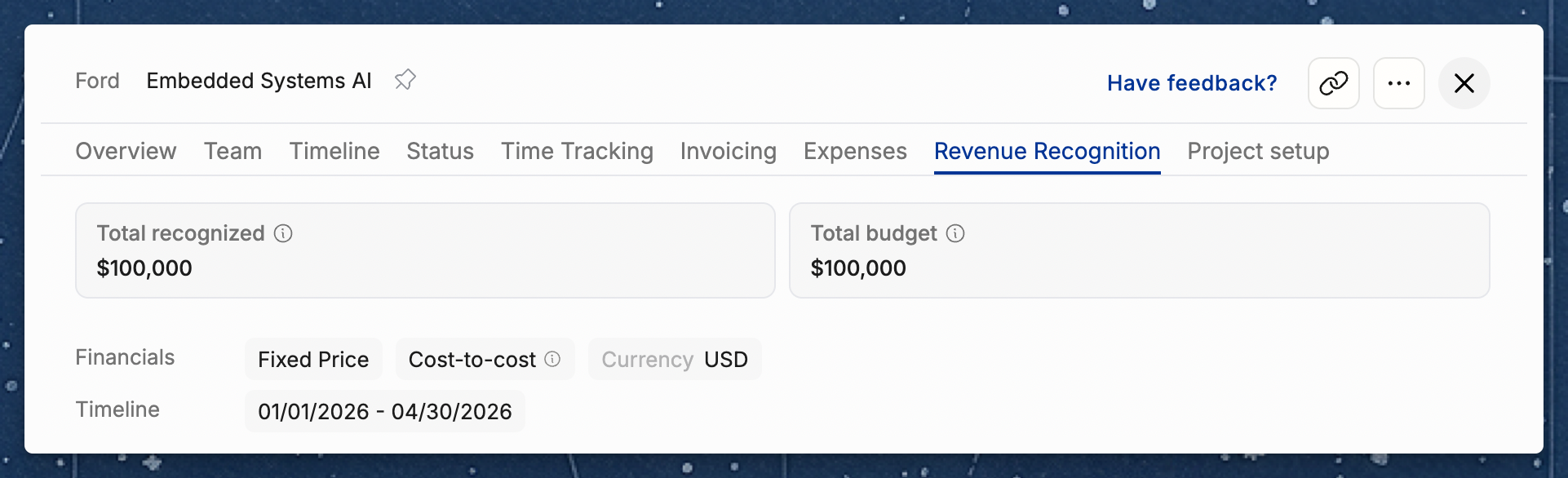
Below the cards, a monthly breakdown lists the project month by month. Select a month to open its detail view.
Practical guidance
Do not change methods mid-project. Switching recognition methods recalculates earned revenue for all periods, which can create confusing jumps in financial reports. Pick a method at the start and stick with it.
If using budget progress, build it into your routine. The most common cadence is monthly, aligned with your month-end close. Some firms add "update budget progress on all active fixed-price projects" as a step in their close checklist.
Revenue recognition is about earned revenue, not cash. It does not determine when you invoice or when you get paid — it determines when revenue is recorded in Operating's financial reports. The invoicing schedule is configured separately and controls when invoices are created.
Related articles
Understanding planned vs. actuals — how planned and earned revenue are compared
Introduction to Financials — configuring billing types, budgets, and rate cards
How to set up rate cards — billing rates that drive the "weighted by hours/rates" method
Budgeting and profitability: a worked example — managing budgets and tracking financial performance