Understanding tasks and task lists
Written By Lauri Eurén
Last updated 3 months ago
Tasks and Task lists let you tag time entries with a more specific label than the Project they belong to — useful for grouping work by activity, charging different billing rates for different kinds of work, or marking certain work as non-billable. This article explains the model so you can decide whether and how to use them.
What a Task is
A Task is a named label for a kind of work that can be attached to a Time entry. When someone tracks time on a Project, they can optionally pick a Task to describe what the time was spent on (for example, "Design", "Code review", "Workshop facilitation").
Tasks are optional. A Project can run with no Tasks at all — every Time entry just rolls up to the Project. Tasks add a second dimension of categorization on top of that.
A Task carries two pieces of financial behavior:
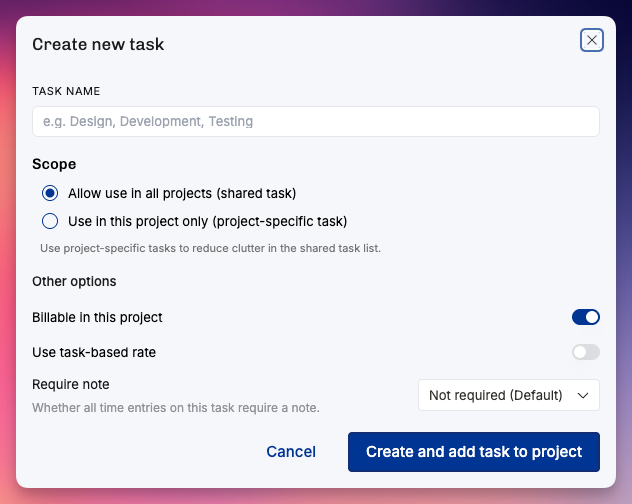
Billable by default. A Task can be marked non-billable, which forces any Time entry tagged with it to a zero rate, regardless of the Person's Position rate.
Task-specific rate. A Task can carry its own hourly rate. When set, it overrides the Position's rate for any Time entry tagged with the Task. This is how you charge a different rate for, say, "After-hours support" without changing anyone's Position rate.
What a Task list is
A Task list is a named group of Tasks. It exists so you don't have to manage hundreds of loose Tasks: you cluster them into themed lists ("Standard delivery work", "Internal time", "Client X custom activities") and apply the relevant lists to the Projects that need them.
A few rules to keep in mind:
A Project can have more than one Task list applied to it.
A Task can belong to more than one Task list.
There is no automatic default Task list — they're created and applied deliberately.
Task lists can be archived when no longer needed.
Shared Tasks vs. project-specific Tasks
Tasks come in two scopes, and this is the distinction that confuses people most often.
Shared Tasks are organization-wide. They aren't tied to any single Project. You create them once and reuse them across as many Projects as you like by adding them to Task lists that get applied to those Projects. Shared Tasks are how you keep activity categories consistent across the organization — so "Design" means the same thing in every Project's reports.
Project-specific Tasks are scoped to a single Project. They exist for situations where one Project needs its own bespoke categories that don't make sense anywhere else — for example, a deliverable name that's unique to one engagement. Project-specific Tasks don't appear on other Projects and don't pollute the shared list.
Project-specific Tasks can optionally report as a shared Task. When you set this up, time tracked against the project-specific Task still rolls into the shared Task in cross-Project reports, so you keep both the local naming and the consolidated view.
How Tasks affect billing and time tracking
When a Person logs a Time entry, Operating works out the hourly rate by checking, in order:
If the Time entry came from an integration with its own rate, that rate is preserved.
If the Task is non-billable, the rate is zero.
If the Task has a task-specific rate, that rate is used.
Otherwise, the Position's rate (or the Rate card fallback chain) is used.
So the Task can override the Position's rate, but only when you explicitly set a Task rate or mark the Task non-billable. So tasks can also control billing for specific kinds of work.
Tasks vs. project phases
Tasks and project phases are independent of each other. They answer different questions:
A project phase is a stage of the Project ("Discovery", "Build", "Rollout"). It groups time by when in the Project life the work happened. Phases don't carry their own budgets —
budgets sit on the Project (and can have their own date ranges).
A Task groups time by what kind of work was done, regardless of phase.
One subtlety worth knowing: a Time entry isn't tagged with a phase directly. The phase association flows through the Position — Positions can be assigned to a phase, and the Time entry inherits the phase from the Position it's tracked on. The result feels the same in reports, but it's why you assign Positions to phases rather than tagging Time entries with phases.
so in short: you can link time entries to a phase – but it happens via the position.
Tasks are not a project management feature
Operating is not a backlog or task-management tool. Tasks here are about labelling time and controlling billing — they're not deliverables you assign to People, prioritize, move through statuses, or close. If you want a backlog, keep using your project management tool of choice and use Operating Tasks to mirror the activity categories you care about for time tracking and reporting.
Permissions
Creating, editing, and archiving Tasks and Task lists requires the Manage tasks permission, which is organization-wide. This is typically given to admins. Once Task lists are applied to a Project, anyone tracking time on that Project can pick from the available Tasks; they don't need the Manage tasks permission to use them, only to manage the catalog.