How to structure permissions based on your company culture
How companies manage access and visibility with Operating permissions
Written By Matti Parviainen
Last updated 3 months ago
This guide presents three proven approaches to organizing your company in Operating. While these examples are based on fictional companies inspired by real Operating customers, each model can lead to significant success. Your choice will shape your company culture and workflows.
In order to have the most effective roll-out of Operating, we recommend matching the openness and control to what you’ve had in the past, with other tools such as spreadsheets. However, it’s better to err on the side of “less access” than to give everyone lots of cool stuff only to take it away moments later.
General Guidelines
Understanding Admin Roles
Admins are the experts who understand Operating's settings, integrations, and data management. They own your organization structure in Operating and understand why Sites, Companies, and other core concepts are configured the way they are.
It's perfectly acceptable to ask your Admin for help occasionally – whether to connect an integration or add a new Role. This is preferable to allowing unnecessary clutter in your system.
Managing External Users
Externals include subcontractors, freelancers, and other non-employee workers who may or may not have user accounts in Operating. Typically, they're invited only if they need to track time, and even then, they're usually given access only to the Hours feature. Learn more about external team members here: What's the difference between in-house and external team members?
Model 1: The Open Organization
Philosophy
Consultants learn during onboarding that the company values responsibility and freedom
To make smart decisions, employees need to understand business impact
Information is openly available to prevent misinformation and encourage good judgment
Permission Sets
Admin, Manager, Employee, [External]
Externals track time only and can view details for projects they're assigned to, including project scope and timeline—but not financial information.
Feature Access
All users except Externals have access to all Features. Externals can only access Hours and Project details.
Role Descriptions and Examples
Managers handle resourcing, project management, and invoicing for their own projects. Sales teams and Managers maintain robust routines to ensure upcoming work is allocated to the right people, with minimal formal handovers between roles.
In some cases, project management is handled by the most senior or socially engaged individual contributor on the team. For steady, hourly-billed engagements, the PM role is relatively lightweight.
Employees focus primarily on client work but can see activities across sales and internal projects. When they have spare capacity, they can proactively offer help. They have access to all areas of Operating, including the Invoicing.
They can also edit their own professional profiles, updating skill levels and availability based on their own judgment. This is what the Employee’s People and Projects and Clients permissions look like in Settings → Permissions.
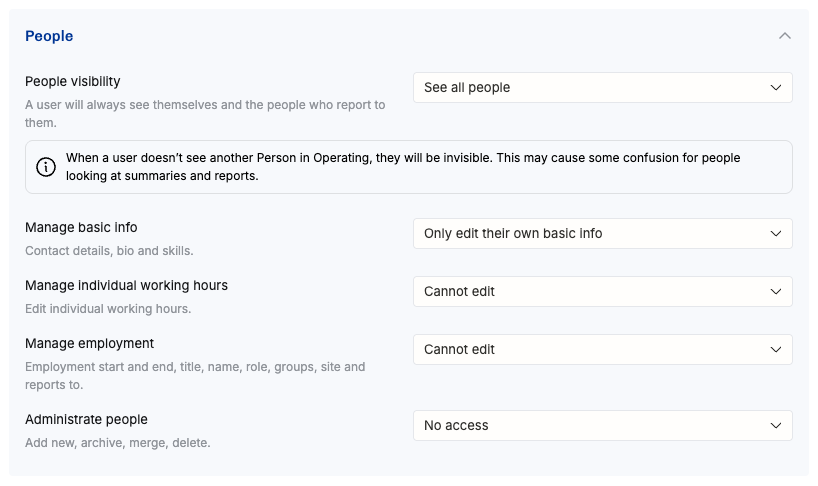
Even if the company culture is open, it doesn’t mean that anyone can edit anything. Each employee doesn’t have the patience to get to know how Operating employment admin stuff works, so let’s prevent them from messing things up.
Ideally, new projects are created during the initial setup and then one by one coming in from the CRM pipeline. (Of course, a sales manager in this kind of company has permission to create clients and projects.)
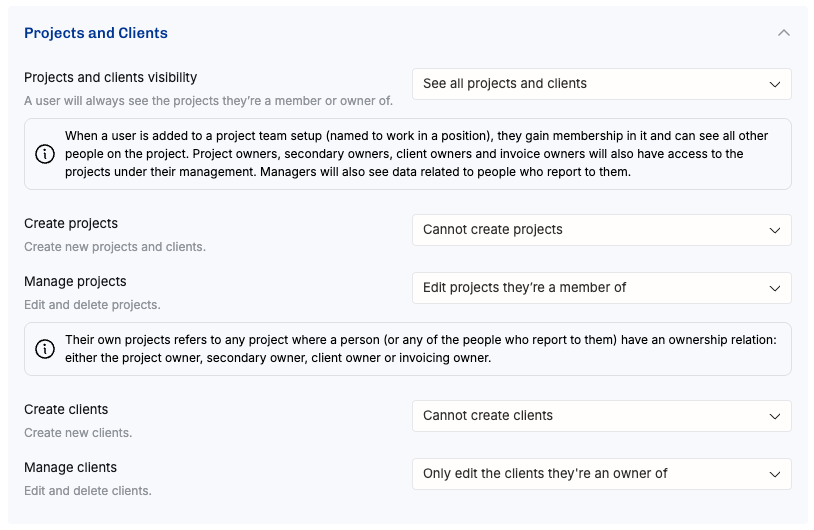
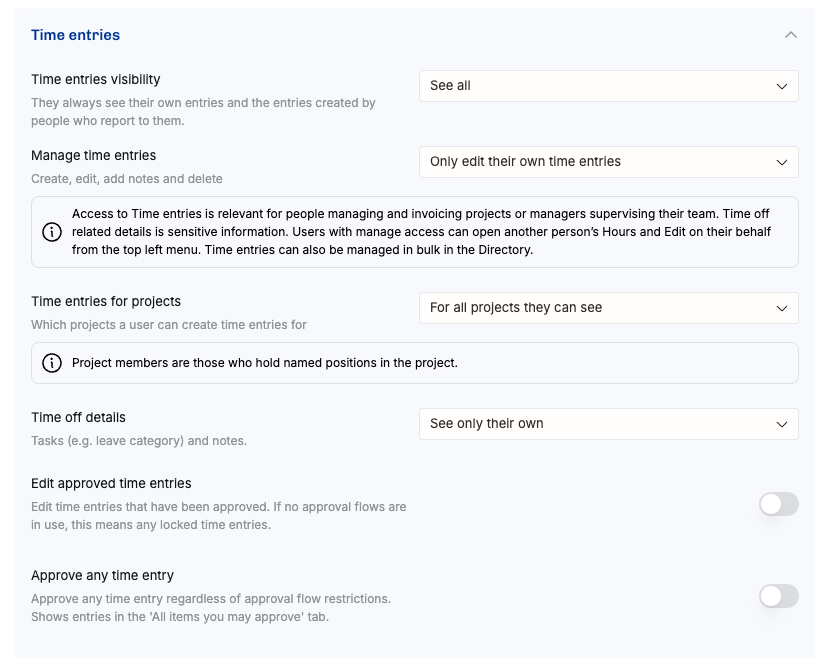
Above you can see that they can see others’ timesheets, but without the time off details. With these permissions, they can also see how exactly the projects are actually going, compared to plans.
Below, you can see that employees can’t see the costs – that would (indirectly) reveal how much their colleagues are paid. Perhaps there’s a consulting company somewhere that exposes this information, but in our example, that’s not the case:
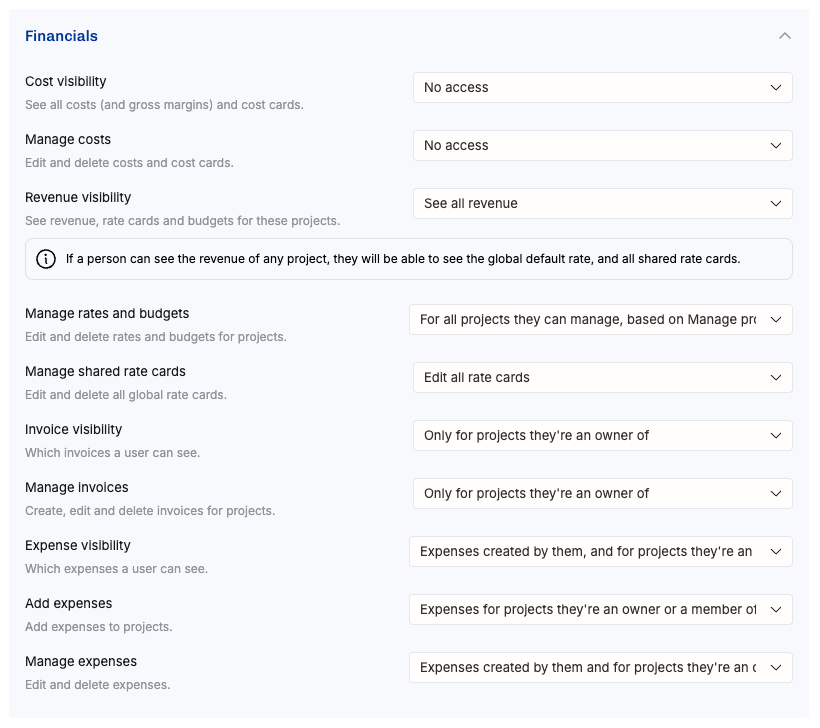
Those are the most important permission settings for an employee in The Open Organization. A huge amount of visibility, but limited editing rights.
Model 2: The Open But Control-Minded Organization
Philosophy
Consultants learn during onboarding that transparency is valued, but they should focus on their core responsibilities
Traditional process mentality with clearly defined responsibilities
If something isn't part of your role, you shouldn't handle it
Permission Sets
Admin, Staffing Manager, Project Manager, Team Lead, Employee, [External]
Role Descriptions
Staffing Managers handle resourcing and take over cases from Sales once they're won. They need access to the Horizon and frequently coordinate with Sales, who primarily work in the CRM for day-to-day management.
Project Managers take over from Staffing Managers once the team setup and schedule are roughly finalized. PMs also handle invoicing for their projects, creating a strong sense of ownership. They must be particularly careful when allocating time, especially for Fixed Price projects.
Team Leads manage approximately a dozen consultants as direct reports. They monitor metrics like utilization and how well actual time tracking aligns with plans. While this supervisory role might seem like micromanagement, when done well, it focuses on mentorship and accelerated career development. Team Leads also perform a reasonable percentage of billable work alongside their managerial duties.
When someone's work begins to go off track for any reason, Team Leads and Project Managers meet to discuss solutions. Staffing Managers must also be informed if someone can't take on additional work despite having free availability.
Employees focus primarily on client work but can still see activities across sales and internal projects. When they have spare capacity, they can offer to help. They can also edit their own professional profiles, updating skill levels and availability based on their own judgment.
Externals track time only and can view details for projects they're assigned to, including project scope and timeline—but not financial information.
Model 3: The Control-Driven Organization
Philosophy
Due to strict NDA requirements or leadership style, visibility into other people's work is limited
The company prioritizes control and clarity over freedom and transparency
Typically paired with process-first thinking and clearly defined responsibilities
Permission Sets
Admin, Staffing Manager, Project Manager, Team Lead, Finance, Employee, [External]
Role Descriptions
Externals and Employees only track time. Project Managers own project information and share details with team members on a need-to-know basis. In this setup, companies typically also use a backlog management or issue tracking tool like JIRA, where consultants focus on their assigned work.
Choosing Your Model
Consider these factors when selecting your organizational approach:
Company culture: Do you value transparency or controlled information flow?
Industry requirements: Do NDAs or regulations limit information sharing?
Team maturity: Can your team handle autonomy, or do they need more structure?
Project complexity: Do projects require tight coordination or can teams work independently?
Remember: You can adapt these models to fit your specific needs. The key is maintaining consistency in how you structure permissions and communicate expectations to your team.