Public Beta: Sidebar navigation & global search
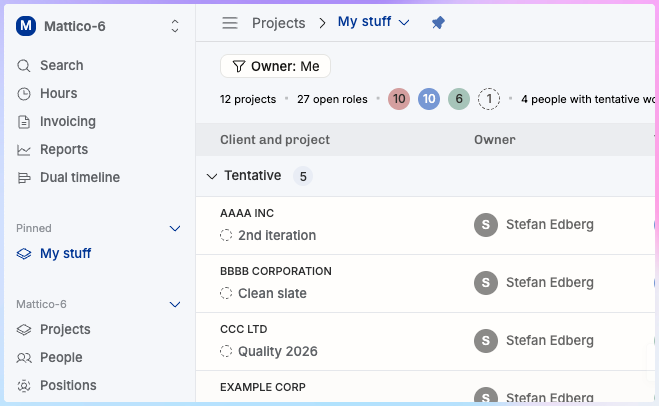
This is the first time we give Operating users a chance to opt-in to a beta feature. We’ve experimented with private beta features before, but this one is kind of massive. Instructions for activation at the end.
Jump to anything in Operating with ctrl+K (or cmd+K on a Mac)
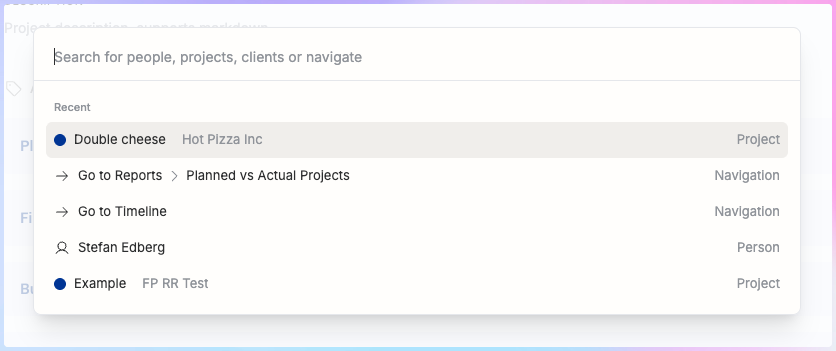
With this global search, you can very easily jump to anything you use (frequently). Try it out.
Sidebar navigation with new structure
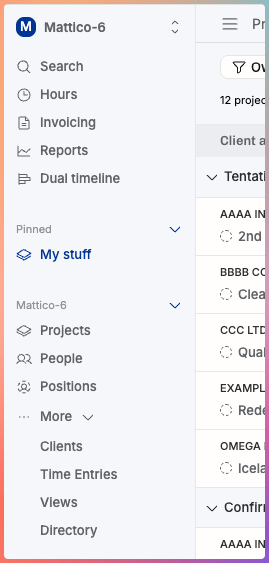
More room for more things on the left – we outgrew our top bar. You can pin your favorite views, and even organize them in folders.
We hope that the main menu items of Projects, People and Positions the learning curve of taking Operating into use is less steep. As a consequence of bringing these high-level concepts to the forefront, we’re reducing some complexity:
Horizon is no more – re-create the “tentative projects”, “available people”, and “open positions” lists as new views, and pin them to the sidebar if you prefer to use the old terminology. We may re-introduce those to everyone after the feedback we get from this public beta testing period. Let us know!
Directory is also going away – it’s still there now, but we hope to replace all catalog lists soon:
In our upcoming design, managing people, projects, clients, views or time entries, happens simply on that area in the sidebar. We’ll add lists with filters, CSV exports, adjustable columns, multi-edit, showing archived items and so on.
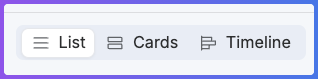
One really neat thing that comes from this redesign is that you can now use the same filter set in Projects (or People), and simply toggle between the List and Timeline. The information architecture changes we’re introducing enable us to do really cool things with the display options.
Try it out and tell us if we’ve misplaced something you absolutely want to keep during this rethinking of where everything should be.
Let’s get it on!
To activate the beta feature for yourself (it only affects you, and can always be turned back off), go to Settings → Beta Features. Toggle on the new navigation and save changes to experience it for yourself!
We’re listening
Don’t hesitate to reach us at support@operating.app if anything feels odd. A new feedback button is also available at the bottom left corner of the app.