Qualitative PM Status & Insights Reporting (RAG)
As a Consultancy COO or Delivery Lead,
I want Project Managers to indicate qualitative health indicators (RAG status) for their projects directly in Operating,
so that I can easily report on and spot delivery risks, client satisfaction issues, and team motivation red flags across the portfolio - aspects that standard financial and budget data cannot capture.
Mock-Up:
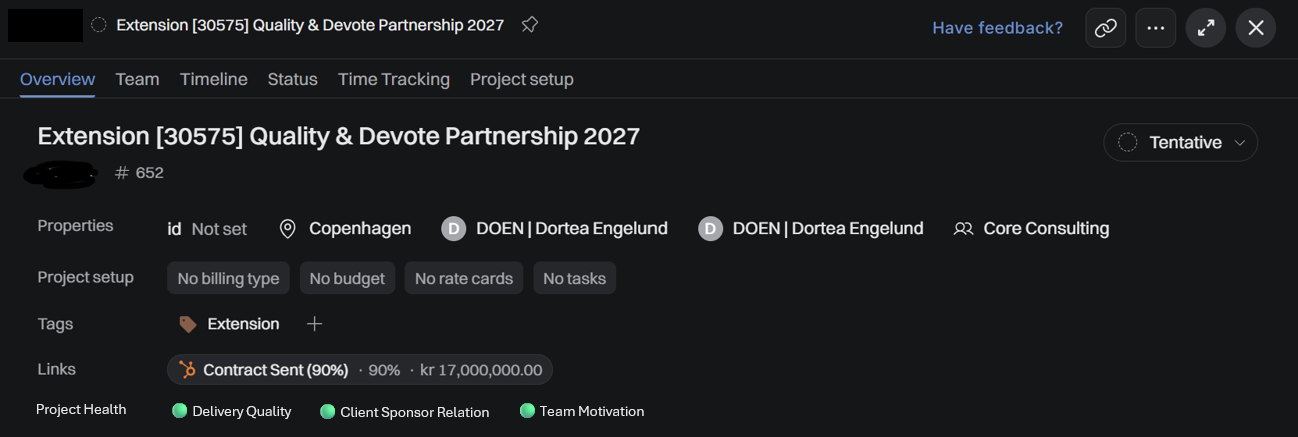
📋 User Story 1: Global Configuration (Admin Settings)
As a System Administrator,
I want to configure up to 5 custom RAG parameters in the global settings,
So that our firm can decide exactly which qualitative areas (e.g., Delivery Quality, Client Sponsor Relation, Team Motivation) we want PMs to track.
Acceptance Criteria:
A new section called "Project Health Status Report Settings" is available in the Company —> Project —> Report Status (or alternatively Project RAG).
The Admin can enable or disable this feature globally via a toggle
The Admin can create, edit, or delete up to 5 custom text labels representing the reporting dimensions.
System saves these configurations globally, and they instantly apply to all active projects
📋 User Story 2: Project Manager Input View
As a Project Manager,
I want to be able to update the RAG status for my project,
So that the organization have one central point of communication of the health of my project to leadership.
Acceptance Criteria:
A new tab or section named "Project Health" is visible on the Project Details page.
Each item features a mandatory dropdown menu with explicit options:
🟢 Green, 🟡 Yellow, 🔴 Red ⚪(when not yet provided)Nice-to-have: Each item features an optional Comment field with max 150 characters to allow the PM to provide context or a mitigation plan.
Nice-to-have: The system displays the date and time of the last update (e.g., "Last updated by [Name] on [Date]").
📋 User Story 3: Leadership & Account Lead Portfolio Dashboard
As an Account Lead,
I want to see the PM-reported RAG indicators directly on the main Project Portfolio/List view, So that I can scan all active accounts in seconds and identify which ones need immediate leadership intervention.
Acceptance Criteria:
The main project list view includes new columns for each globally configured RAG parameter.
The columns visually display the color badge (🟢, 🟡, 🔴) corresponding to the PM's latest update. If a project has no status submitted yet, the badges display as grey/empty (⚪).
Nice-to-have: Users can sort and filter the project portfolio list by these RAG statuses (e.g., "Show all projects with Red”).
Nice-to-have: Hovering over a color badge displays a tooltip showing the PM's short text comment.
Log in to comment and vote
Comments1
Matti Parviainen
Nov 11
We plan to include more qualitative indicators and hope to get the content either calculated automatically, or from outside Operating (e.g. JIRA/Linear/etc) if the project health is followed there.
Allowing to set it manually in Operating makes perfect sense as well.
Thank you so much for the write-up, Dortea!