Forecast revenue as accurately as possible. New capped T&M billing type. Cost-to-cost revenue recognition.
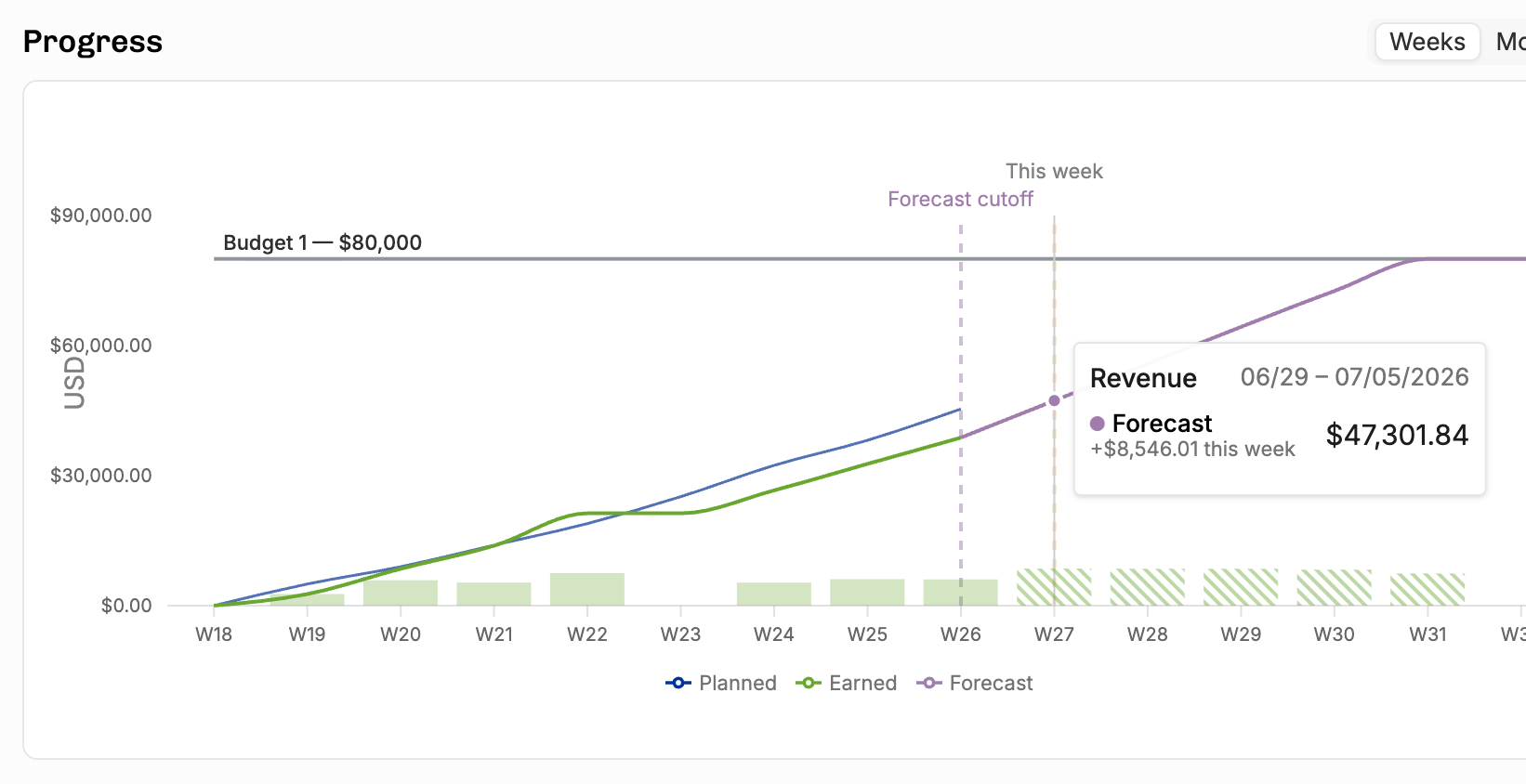
Forecasted Revenue: actuals through a cutoff date, plans after that
Maybe your team has tracked time until the end of last month or last week – choose the date you feel confident with. (Or go with the default your admins have set.) This is built in to the individual project detail pages:

All of the values in the burnup/periodic graph follow the chosen cutoff, no matter what units and display options you choose: you can forecast hours, costs, or revenue.
The Forecasted revenue/cost columns have been added to project lists and the portfolio report.

Comprehensive financial figures (expenses etc) in the Project Details
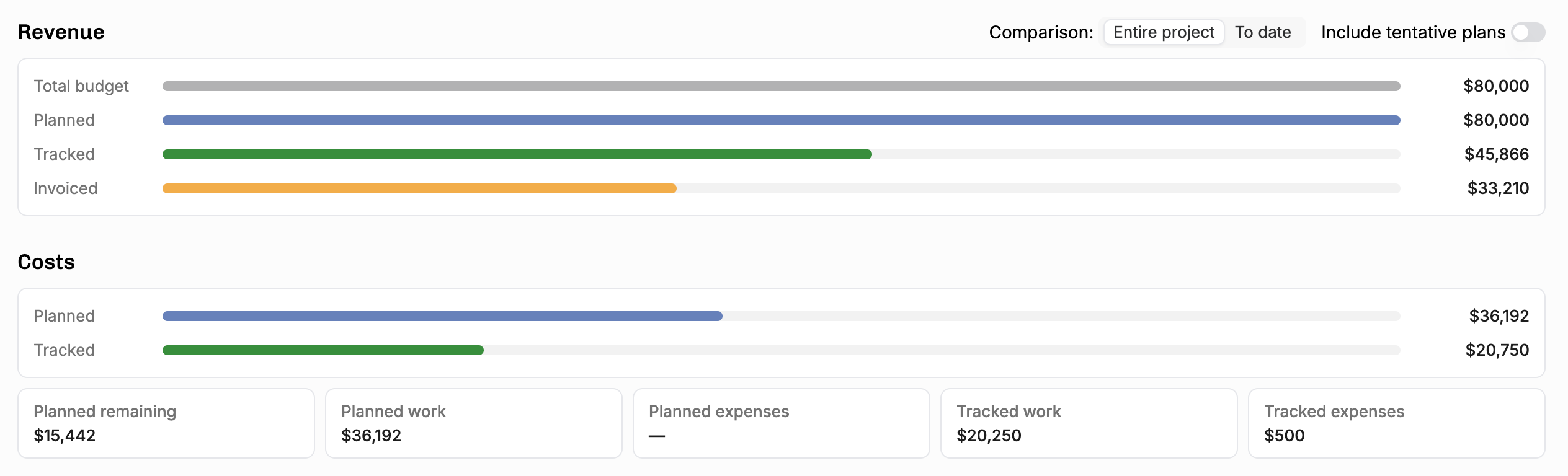
So many wrinkles ironed out:
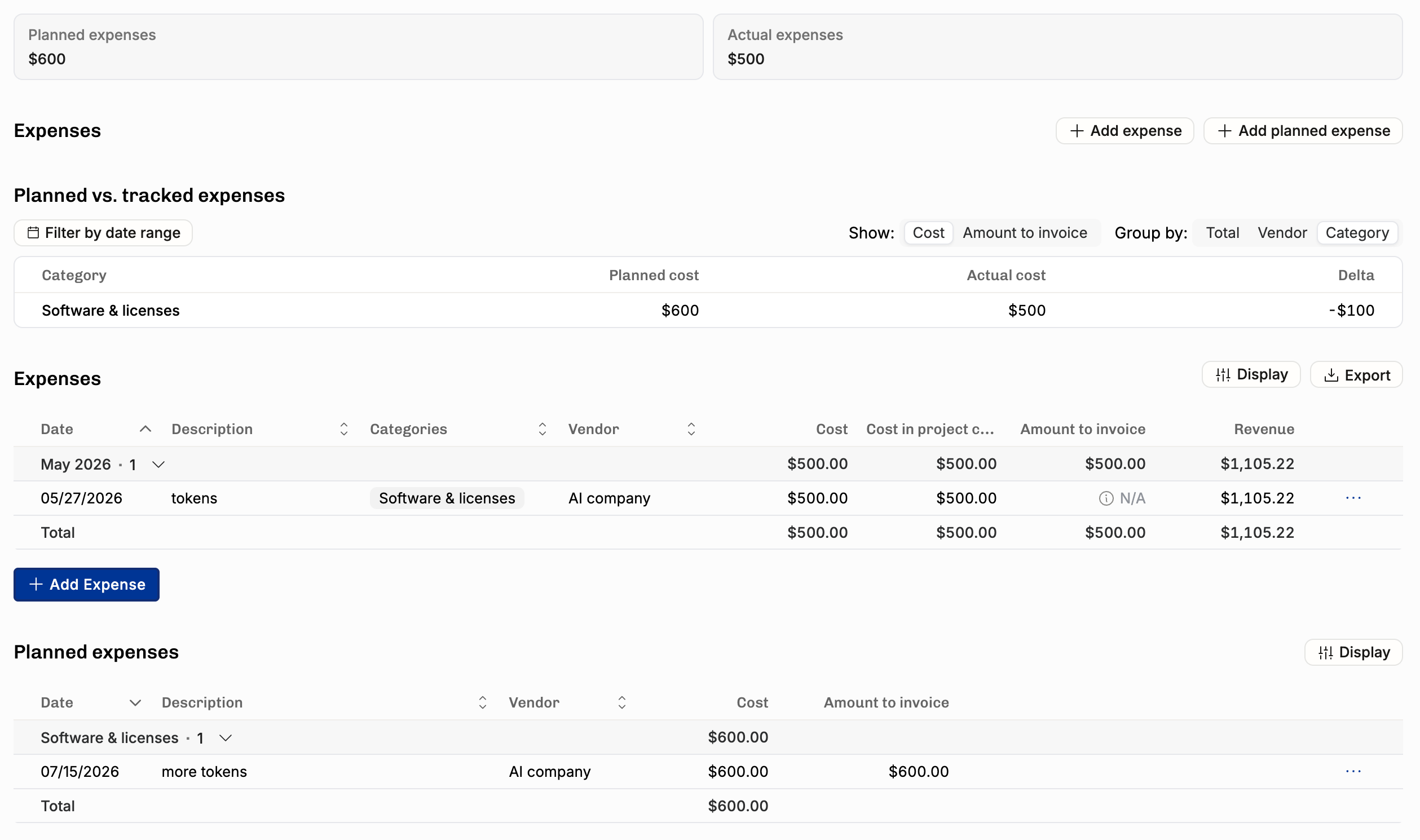
Planned expenses: dedicated list view and CSV export
Burnup chart now splits planned and earned into expenses vs. personnel lines
Compare expenses and planned expenses by vendor and category
Create actual expense from a planned expense (one-click conversion)
Create vendor directly from the planned expense list
Sort expenses and planned expenses by category or vendor
Effective hourly rate now accounts for expense budgets
Making progress, recognizing revenue
For careful financial management of big fixed-price projects, this is crucial. Set Budget Progress modal shows all the relevant reference numbers:
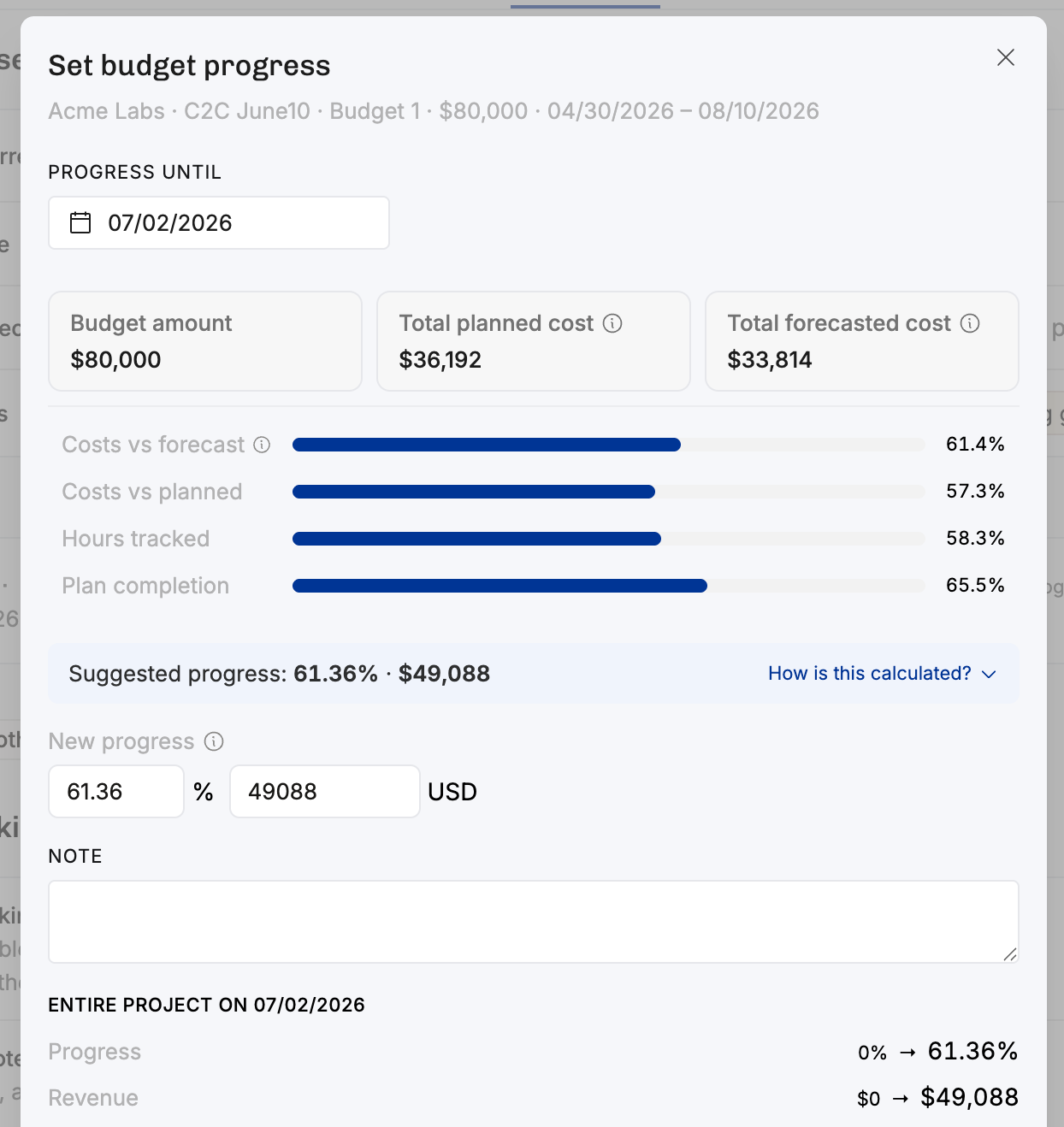
It’s now possible to set 0% progress – or even record a negative change, if the project has indeed gone backwards.
New revenue recognition method: cost-to-cost
Read more about RR and the new method (comparing total planned costs to costs tracked to date). What’s great about the cost-to-cost method is that it updates real-time, unlike the “based on planned or tracked, weighed by rates” method that requires you to set budget progress manually.
What is RR and have I been doing it wrong the whole time?!
If you’re having a hard time wrapping your head around Revenue Recognition and would like Operating to help, drop us a line at support@operating.app. We’ve added a ton of tooling around this topic and can show you much more if you’re interested. Your finance team might love you afterwards.
New billing type: capped time and materials
Sometimes you end up in an agreement where you bill based on time & materials tracked, but still have to set a maximum amount. This kind of “ceiling” or “cap” is unfortunate for you as a consulting business, but understandable from the client point of view: when their budget is spent, it’s gone.
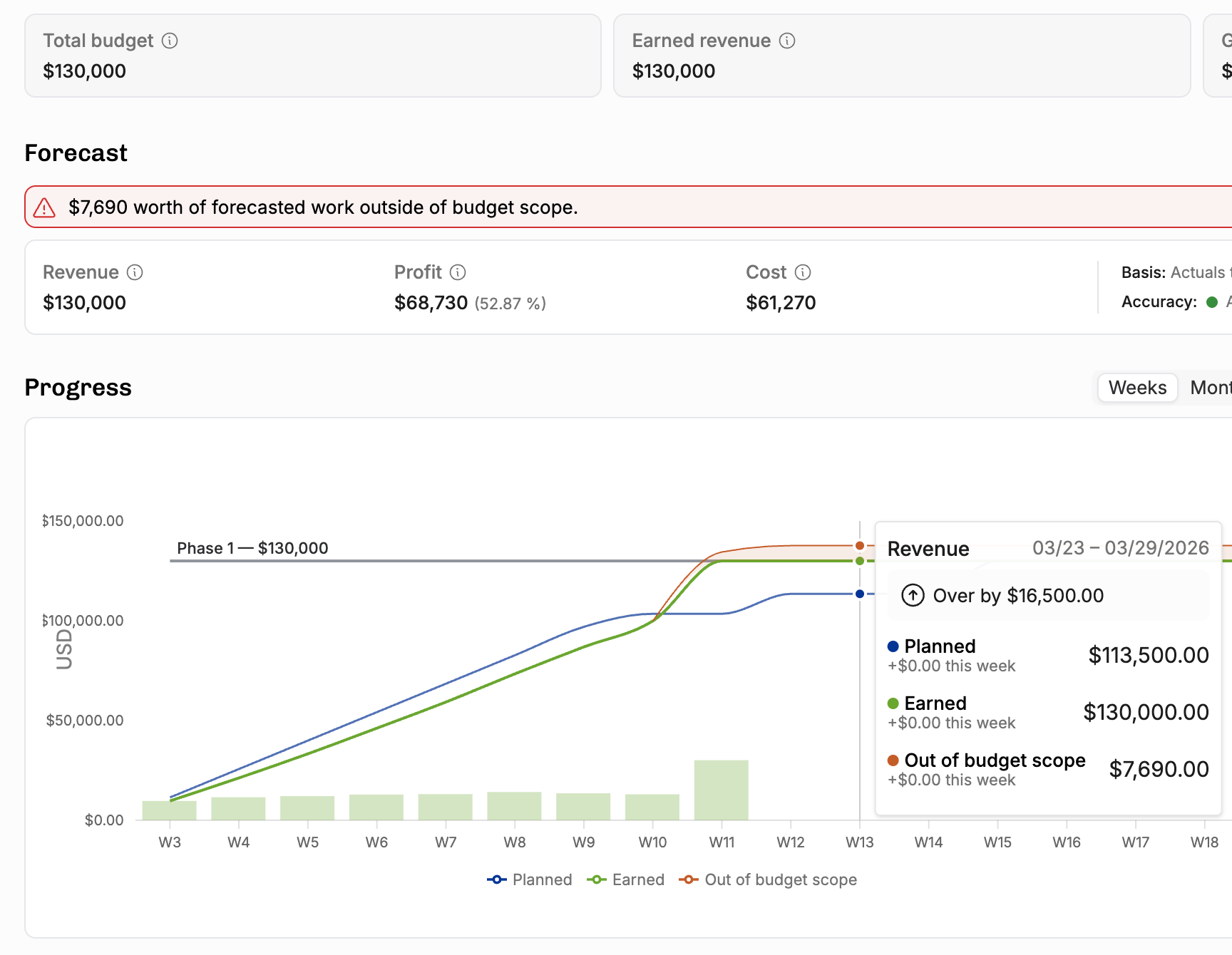
As the one absorbing the overage, you most definitely want to see the project turn red if the plans exceed the maximum. The screenshot above shows what that unwanted scenario would look like. More on capped T&M on our support site.
To keep the billing type naming consistent, “Per hour” is now called “Time and Materials”
We hope the new label feels intuitive. In the API, the billing type has been time-and-materials all along.
MCP goodness (use Operating from your AI chat)
The MCP server is now a near-complete interface to Operating. We now have the base toolset in place and we have introduced broader tools to manage context better. Mikko wrote about what it can do – check out his blog post. Lauri put together this nice example of how it can turn your Statement of Work docs into Operating projects. Bleeding edge, we love it.
We will start deprecating some of the more granular tools in the coming weeks. No functionality will be lost, but some tools are going to be removed with their functionality moved to others.
Sorry (not sorry) for moving fast with the MCP alpha development, let’s call this a beta and keep it as is for a while. Attentively listening to your user feedback!
list_reference_data is the approach to find metadata for things like tasks, rate cards, sites etc.manage_project replaces: create_project, update_project, delete_project, create_phase, update_phase, delete_phase. manage_positions replaces: create_position, update_position. manage_allocations replaces: create_allocation, update_allocation, delete_allocation. manage_project_financial_plan is broader and replaces: create_budget, update_budget, delete_budget. manage_project_expenses replaces: create_expense, update_expense, delete_expense.
Read/report tools and other improvements:
list_clients,list_reference_data,list_invoicesreport_planned— planned work and revenue over a date rangereport_actual— actual work and earned revenue over a date rangeTime balance included in
get_person/list_peopleBetter date-range querying for all reporting tools
MCP now validates time entries correctly on create (was bypassing some checks)
Alpha feedback from early MCP users incorporated
Time Tracking fixes (a couple of dozen bugs crushed)
Manual time entry rate override — set a custom rate on any time entry, even invoiced ones (with confirmation)
Admin timesheet unlock — admins can now unlock a timesheet after a user locks it erroneously
Edit time entries directly from the project time entry list
Date range filter in the approvals tab
Import rates from time entry CSV: get your historicals without retroactive rate card busywork
Link from timesheet display menu to "all my time entries" filtered in the Time Entries
Time entry CSV import handles large files properly
Time entry CSV import validates time-off tasks and handles archived employees
Prevent creating new time entries for archived positions
Time entry decimal/minutes display fix in list views
People list: new columns for "timesheet locked at" and "last time entry date"
External project name column in time entry list (for Harvest-imported entries)
Timeline fixes (more bugs crushed)
Moving whole project on timeline now updates estimated end date
Budget-only (no work) projects shown in collapsed timeline rows
Total bar shows correct totals vs. individual allocations
Tooltip shows correct hours/days in daily view
Person detail page timeline opens to correct date
Sidebar close button moved inside sidebar
Restore tentative line behavior in burnup chart
Even more fixes (I am not kidding, the list goes on)
Time balance stamp can now be set before person.createdAt
Person with future employment start now shows up in suggestion panel
User can now see their own time-off position with "see only my projects" permission
"Do not use rounded currency" now shows 2 decimal points
Multiple deadlock fixes (time entry create/update, position delete, working hours delete)
PDP planned vs. tracked shows correct plan numbers
CRM can't update billing type if project has invoices — properly blocked
Prevent archiving the "Public Holidays" time-off category when automation is enabled
Same-named tasks no longer merge in time entry list grouping
Invoice creation no longer crashes on "." or "-" input
CRM project create/update no longer sets invalid start/end date configurations
CRM deals no longer create projects with currencies that don't exist on the tenant
Duplicate collection mapping memberships fixed
Double public holiday on same day no longer creates two time entries
Export People now includes archived persons
Availability sort duplication fixed
Refresh no longer required for budget insights after update
Timesheet list view: editing entry to 0:00 now saves correctly
API: list allocations no longer validates outgoing percentage
API: company get/list returns defaultCurrencyCode
API: 400 instead of 500 for malformed ID filters
Various CRM import edge cases (budgets for archived projects, etc.)
and, believe it or not, much more.
What’s next?
It’s July, and the Summer holiday season is on – you will always get quick support from the in-app chat or from support@operating.app. We’ve planned the Time Off using a really cool SaaS that makes it very easy. 😎
We’re working on our brand and expect to present a new look later this year.
System of Record work is well underway, eager to tell you more in the next changelog.
If you read this far, please leave us a review on G2. It truly helps others find the product. Thanks!