Statuses in Operating
In depth dive into how project and allocation statuses work in Operating
Written By Mikko Karjalainen
Last updated 8 days ago
Operating is all about following what the status of work is.
Your external systems most likely has a deal/opportunity/project status or a pipeline stage. More about those below.
Project status
Every project has a status. Statuses name the stages a project goes through, and each status belongs to one of four categories. The category decides how the project behaves – including whether it still takes new time entries, expenses and invoices.
Tentative – the project is still only a plan, and it may not go ahead. Takes time entries and expenses, but not invoices.
Confirmed – the project is happening, whether the work is still to start, under way, or already over with a few things left to finish. Takes time entries, expenses and invoices.
Completed – the work is done. No new time entries, expenses or invoices.
Cancelled – the project was called off, and the work did not happen. No new time entries, expenses or invoices.
Use Completed for projects that were delivered, and Cancelled for projects that were lost or called off. You can still archive a project to hide it from the timeline.
Adding your own statuses
Each category comes with a default status of the same name. If you want to track finer stages, admins can add statuses under any category on the Project statuses settings page – for example Kick-off, In delivery and Wrapping up under Confirmed, or Declined by us under Cancelled. A status you add behaves exactly like the rest of its category, so you can name your stages freely without changing what the project allows. Drag and drop statuses within a category to show them in your preferred order. All statuses are visible in the status selector on the project details page, so anyone updating a project can pick the exact stage it’s in.
Read more: Project Statuses: customizing and use
Work effort (allocation) status
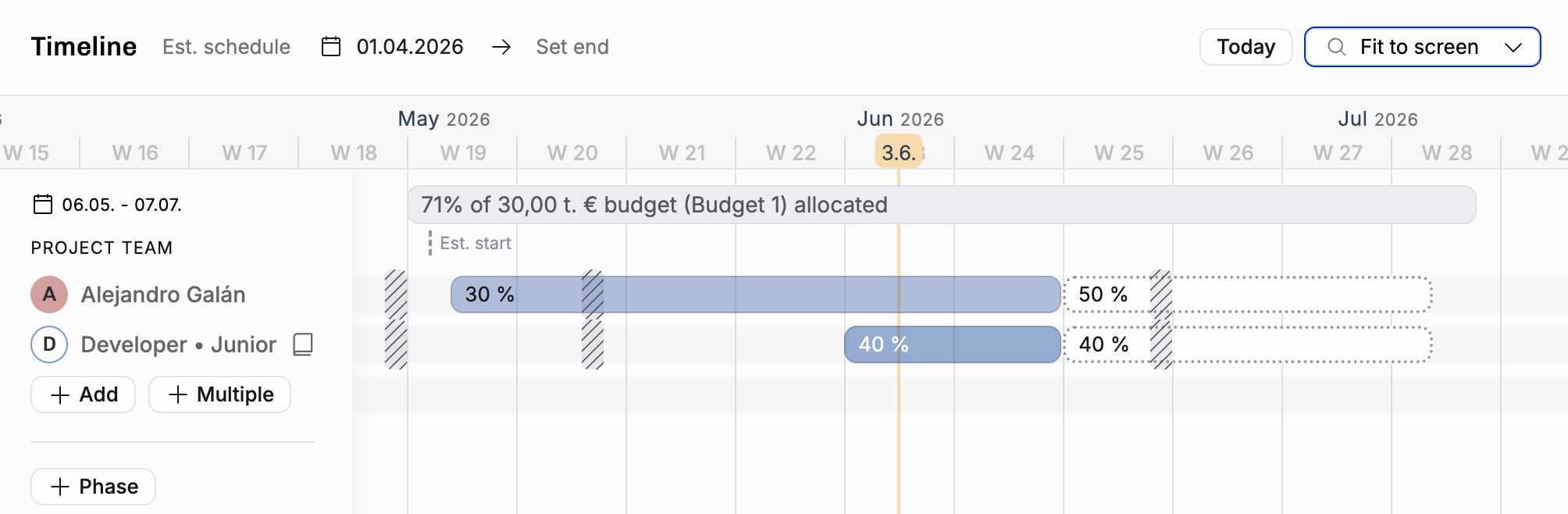
Allocations that belong to a tentative project are tentative.
Confirming a project confirms all of the related allocations. After confirmation, you may add tentative allocations to the project – e.g. a project continuation for one or more positions.
All of the individual allocation bars–work efforts–can be tentative or confirmed. They can be deleted, not archived.
Rows in projects on the timeline are called Positions – it’s the entirety of the allocations on one row. Think of it as a “role in the team” allocation for te project can change over time. These can be archived.
If you have tentative work for a Position you archive, that gets hidden from all reports – that work never happened.
If you have confirmed past work for a Position you archive, it’s considered done, and will remain visible in reports.
CRM deal / opportunity status

CRM deals can be viewed on the project details page under connections or in the project list views. This example shows 4 deals related to the same Multibble deal project. Perhaps unrealistic, but demonstrates many things: HubSpot and Pipedrive deals appear nicely next to each other, showing the deal status from the source system (e.g. LOST for the Pipedrive deal). The latest deal’s CRM status is shown on top – In Negotiation, in this picture.
Refresh the CRM data to get up-to-date statuses for all of the deals.
Intentional lack of sync between CRM and Operating
We appreciate the fact that the sales process is not equal to the staffing process.
Sales & marketing teams work in CRM and focus on talking to clients and prospects
Staffing & operations team works in Operating, excited about the deals that show up when they’re far enough in the pipeline
Staffing begins, consultants get “soft booked” to cases even if they’re 80% probable
The different scenarios are valuable to keep in mind – and we don’t delete them immediately if the deal is marked “lost” in the CRM
The How to run a staffing routine with Operating should process the lost case in due course, let related people know that this didn’t happen, and what’s the plan(s) instead.
Similarly, closing a deal as won does not automatically confirm the staffing plan in Operating. Sometimes the staffing puzzle may still be solved in a number of ways. Ideally, you haven’t locked the names yet, and still have room for manoeuvre.
Changing the project’s status in Operating does not affect the deal in the CRM.
Consider deciding on a best practice how to communicate from staffing to all relevant stakeholders (sales, competence team leads, team members) when a team setup & schedule has been set.
Can be as simple as announcing the decision in Slack/Teams, and linking to Operating if anyone wants to see more details.
Was this helpful?
Still need help? Ask the team