Groups
Use Groups to mirror the parts of your organization structure that matter for reporting, filtering and permissions.
Written By Mikko Karjalainen
Last updated 18 days ago
Video - 1 minute - introduction to Groups
Operating allows you to replicate your organization structure to the extent that it matters. You don’t have to add all teams, hierarchies and reporting structures, but if you want to see the reports in that way, please do so.
People, Projects and Positions can each belong to Groups, and to several at once. A Position carries its own Groups, separate from the Groups of its Project. See the section "Groups on a Position" in What are Positions and Allocations?.
For the locations your people work in, see Sites. For labels on Projects and Clients, see Project and client tags.
An example: Groups as cross-border business units
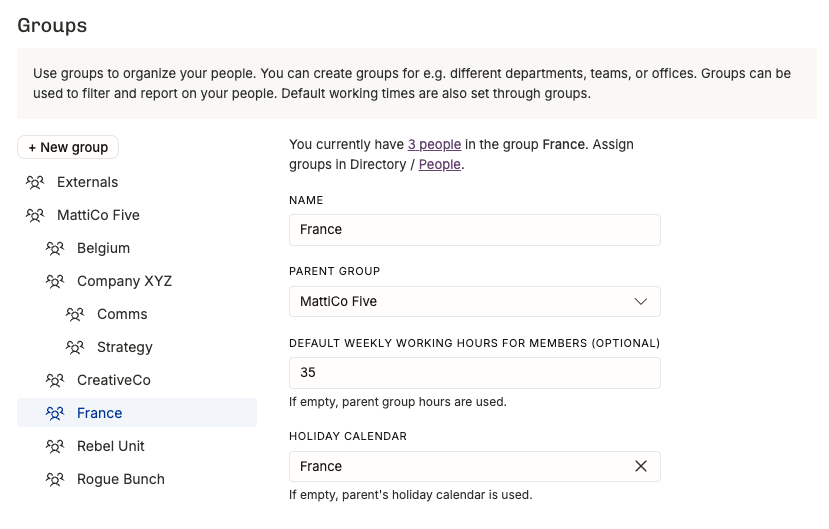
Here you can see an example of a company called MattiCo Five that has been formed after a merger of multiple agencies that continue to work as separated business units (CreativeCo, Rebel Unit, Rogue Bunch, and Company XYZ with two units inside of it). Their people are located across Belgium and France. They also work with Externals, which they have put in a group outside of the MattiCo Five hierarchy.
This allows:
reporting by unit or by country
filtering and grouping people and projects by business unit across the whole organization
Filtering by Groups
When you’ve added Groups, the filtering panel shows them as options:
On the People and Projects lists, use the Group filter.
On the Positions list, filter by Project Group or Position Group, because a Position can sit in a different Group from its Project.
In time entry lists, filter by Project Group or Person Group.
Combine a Group with other criteria to narrow a list down — for example, all Projects in the Rebel Unit group with a Site in France. Save the filters you use often as a view.
Remember that you don’t want to over-complicate your fundamentally simple business. Add the Groups you will actually use, not more.
Was this helpful?
Still need help? Ask the team