How to choose a fixed-price forecast method
On a fixed-price Project the total is fixed — the forecast decides when it lands. This article explains the organization-wide Fixed-price forecast method setting: what its two options do, how they differ on the same numbers, what happens when scope changes, and how your choice shows up when you record budget progress.
Written By Mikko Karjalainen
Last updated 2 months ago
On a fixed-price Project the total is fixed, so the interesting question is not how much will be earned but when. Operating has two ways of answering that, and you pick one for your whole organization with the Fixed-price forecast method setting.
This article explains what each option does, how they differ on the same numbers, what happens when scope changes, where to change the setting, and how your choice changes the Add progress indication dialog.
The setting is available to every organization. There is no feature flag and nothing to switch on — you only need Settings access (permission to manage organization settings) to change it. New organizations start on Forecast based on recorded progress, which is the behaviour Operating has always had, so leaving the setting alone changes nothing.
Which Projects this applies to
The setting only affects fixed-price Projects using one of these revenue recognition methods:
Based on time planned or tracked, weighted by hourly rates (the fixed-price default)
Cost-to-cost
It does not affect:
Fixed-price Projects recognized evenly by week or evenly by month — those spread the Budget across the calendar regardless of progress, so there is nothing for the setting to change.
Time-and-materials or capped time-and-materials Projects.
Earned revenue. The setting only changes the forecast — the part of the timeline after the forecast cutoff date. What has already been recognized is not rewritten.
The two options on the same numbers
Take a Project with a €10,000 Budget, recognized cost-to-cost — actual costs measured against planned costs — running January to April. The forecast cutoff date is the end of February. One budget progress indication has been recorded, dated 28 February at 40% — so €4,000 is earned so far.
The Budget's cost — the internal cost of the work (hours × cost rate) plus the cost of any billable expenses — looks like this, with tracked cost up to the cutoff and planned cost after it:
Here is the forecast each method produces from exactly those numbers:
Both land on the €10,000 contract value. They disagree about the shape.
Forecast based on recorded progress (the default)
This is Operating's original behaviour. It takes what has been recognized, subtracts it from the Budget, and fits the remaining plan into the remaining money:
Recognized so far: €4,000
Remaining Budget: €10,000 − €4,000 = €6,000
That €6,000 is spread across March and April in proportion to their planned revenue, which here follows planned cost — €2,000 against €4,000, so 1:2.
March gets €2,000, April gets €4,000.
The recorded progress indication is treated as the truth about where the Project stands. The remaining plan is scaled up or down to fit whatever Budget is left over.
Forecast based on absolute progress
This option ignores the "fit the remainder to the plan" step and recomputes each future period from scratch. For every period it asks: by the end of this period, what share of the Budget's total forecasted cost will have been incurred? That share, multiplied by the Budget amount, is the cumulative revenue the Budget should have recognized by then. Each period earns the difference from the period before it.
End of March. €1,000 + €1,000 + €2,000 = €4,000 of the €8,000 total cost = 50%. Cumulative revenue should be 50% × €10,000 = €5,000. €4,000 is already recognized, so March earns €1,000.
End of April. €8,000 of €8,000 = 100%. Cumulative revenue should be €10,000. €5,000 is accounted for, so April earns €5,000.
On a Project recognized based on time planned or tracked, weighted by hourly rates, the arithmetic is identical, but the basis is time value (hours × billing rate) rather than cost.
Because each period is derived from completion rather than from what is left in the Budget, the forecast moves whenever the underlying plan or actuals move — and it tells you when the recorded progress and the delivery data have drifted apart, instead of quietly absorbing the difference.
What happens when scope changes
Absolute progress has to reconcile two things that can disagree: revenue that has already been recognized, and revenue that the completion percentage says should have been recognized. It does that in three steps.
1. Periods with recorded progress are locked. Every period that starts on or before the date of the most recent budget progress indication keeps exactly the revenue that was recognized in it. Recognized periods are never silently re-forecast.
2. The first unlocked period absorbs the gap. The next period after the locked ones is where the difference lands. If recorded progress was behind the delivery data, that period catches up with extra revenue. If it was ahead, that period gets less.
3. If the gap is negative, it becomes a revenue correction. When the first unlocked period's calculated revenue comes out below zero, Operating zeroes the other revenue in that period and adds a separate revenue correction line carrying the negative amount. The correction is forecast only — it does not touch actuals, and it is shown alongside any real revenue corrections in the same period.
Worked example: the Budget is cut
Continue the same Project. In March the client renegotiates and the Budget is reduced from €10,000 to €6,000. The plan and the tracked cost are unchanged, so the cost basis is still €8,000 in total, and €4,000 is still recognized from January and February.
January–February — locked by the 28 February progress indication. They stay at €4,000.
March — completion by end of March is still 50%, but of a €6,000 Budget: cumulative revenue should be €3,000. Against €4,000 already recognized, that is −€1,000. March's other forecast revenue is set to zero and a revenue correction line of −€1,000 appears in March.
April — completion is 100%, so cumulative revenue should be €6,000. With €3,000 accounted for, April earns €3,000.
The forecast lands exactly on the new contract value, the over-recognized €1,000 is visible as a correction rather than hidden, and no already-closed period was rewritten. This is how revenue adjustments are normally handled for accounting: you correct forward, you do not rewrite the past.
When there is nothing to measure against
If a Budget has no usable basis — no cost or time value data at all, or a viewer who cannot see costs on a cost-to-cost Project — absolute progress cannot compute a completion percentage. In that case Operating falls back to spreading the unrecognized remainder evenly across the Budget's remaining periods. The forecast still totals the Budget; it just has no shape to follow.
Where to change the setting
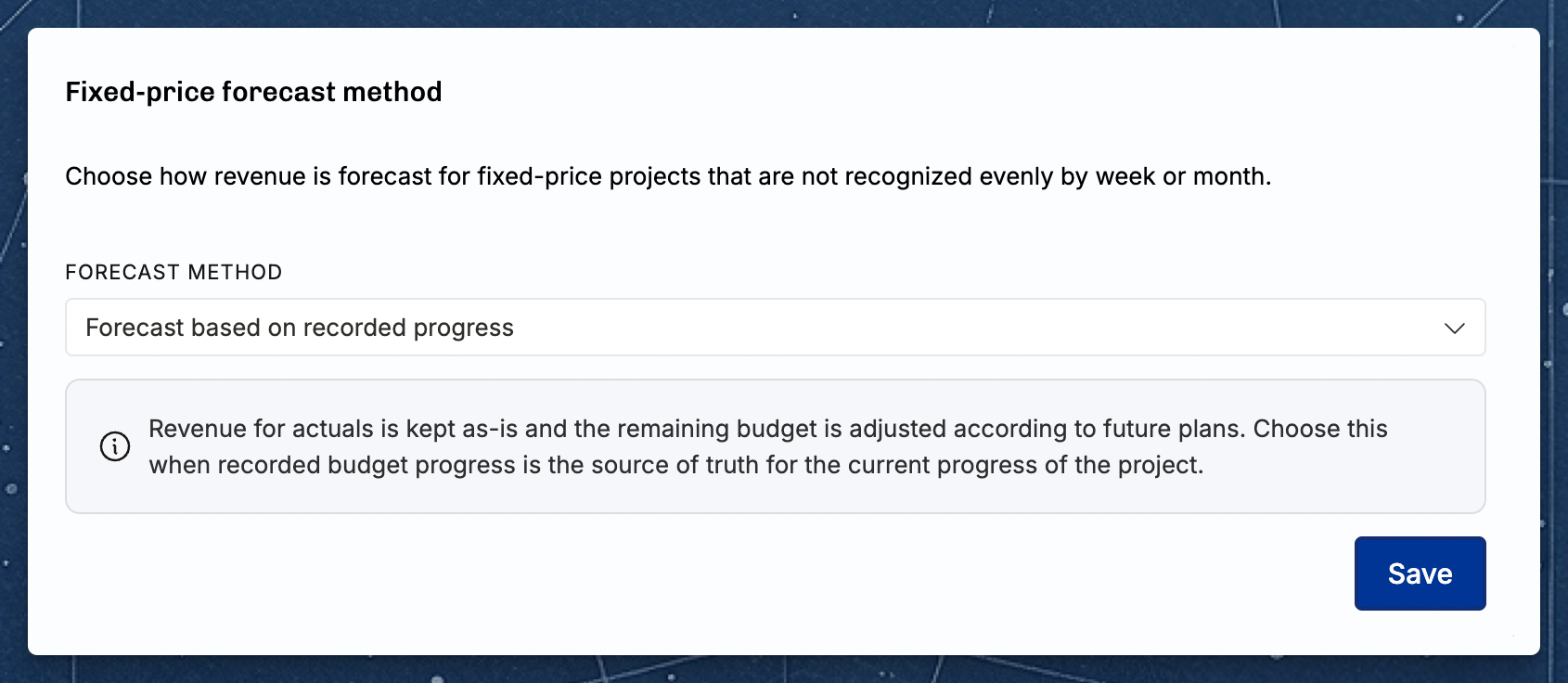
Go to Settings → Financials → Forecast.
Find the Fixed-price forecast method section, under the default forecast cutoff setting.
Open the Forecast method dropdown and pick Forecast based on recorded progress or Forecast based on absolute progress. A short explanation of the selected option appears below the dropdown.
Click Save. A confirmation reading "Forecast method updated" appears.
The setting applies to your whole organization — there is no per-Project override.
How the setting changes the Add progress indication dialog
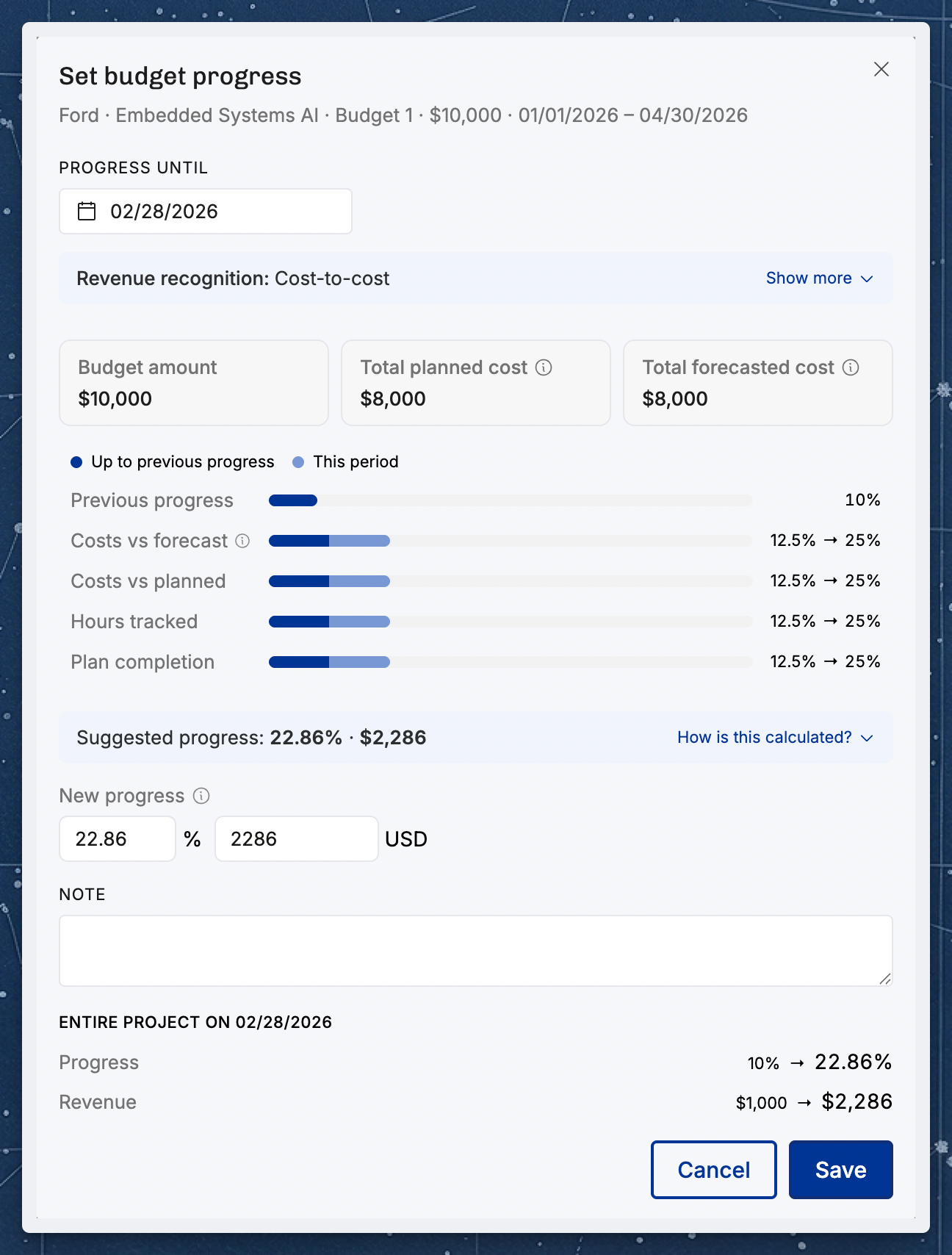
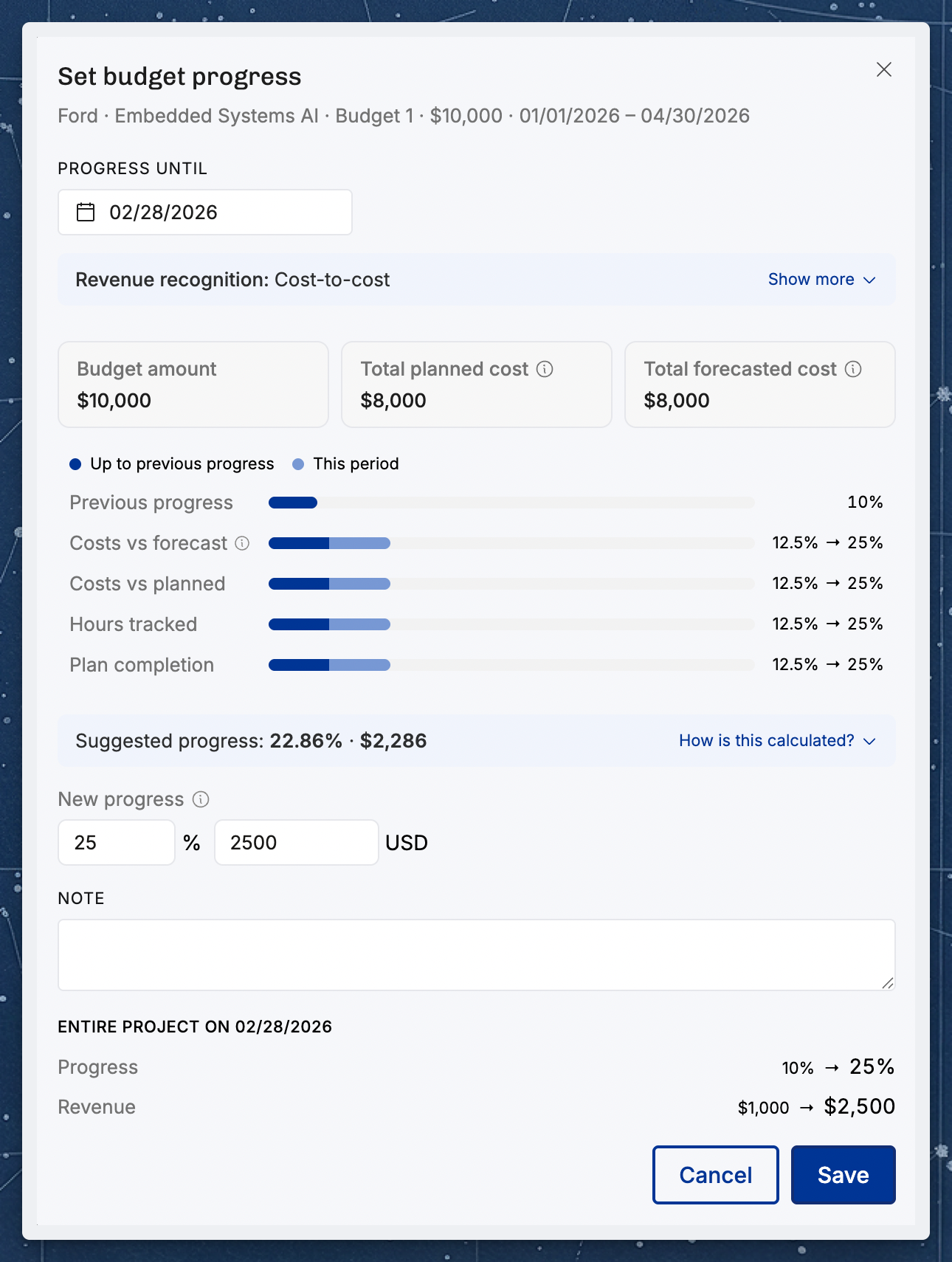
When you add a budget progress indication, Operating offers a Suggested progress percentage and pre-fills the field with it. Expanding "How is this calculated?" shows where the number came from. The forecast method changes both the number and the explanation, so the suggestion always agrees with the forecast you will see afterwards.
Using the same Project, imagine you are adding the 28 February indication and there is already an earlier indication dated 31 January at 10%, at which point €1,000 of cost had been tracked.
Under "Forecast based on recorded progress"
The suggestion is anchored on the previous indication: the part of the Budget still open earns progress in proportion to how much of its remaining forecasted cost has been incurred since that entry. The breakdown has five rows:
Suggested progress: 10% + 90% × 14% ≈ 23%.
Under "Forecast based on absolute progress"
The suggestion is a plain quotient — everything tracked so far as a share of the forecasted total. There is no anchoring on the previous entry, and a Budget whose period has ended is no longer forced to 100%. Divergence from the recorded figure is exactly what this method is meant to surface, so it is left visible rather than smoothed away. The breakdown has two rows:
Suggested progress: €2,000 ÷ €8,000 = 25%.
The two rows are labelled after the recognition method — Cost tracked to… and Forecasted total cost on a cost-to-cost Project, Time value tracked to… and Forecasted total time value on a weighted-by-hours-and-rates Project — and the description above them changes to match.
In both cases the suggestion is only a starting point. If a signed-off milestone means the Project is really 40% complete, type 40% — the suggestion is there to save you the arithmetic, not to overrule your judgement.
One thing to watch on cost-to-cost Projects
On a cost-to-cost Project, the suggestion is built from internal cost, so it is only offered to people who can see costs. Someone without cost visibility sees no suggestion at all in the dialog, and can still enter a percentage by hand.
There is a related quirk worth knowing: even for a person who can see costs, if the Budget has no usable cost data the suggestion quietly falls back to the recorded-progress calculation and shows the five-row anchored breakdown — regardless of your organization's setting. The breakdown you see always describes the calculation that actually produced the number, so if the rows do not look the way you expect, that fallback is why.
Which one should you choose?
Choose Forecast based on recorded progress if:
Budget progress indications are your source of truth for where a Project stands.
You want the forecast to keep recognized revenue untouched and simply fit the rest of the plan into what is left of the Budget.
You prefer a forecast that never produces negative periods.
Choose Forecast based on absolute progress if:
You want each future period's revenue to follow measured completion — tracked cost or time value — rather than the shape of the remaining plan.
You want scope and Budget changes to appear as explicit revenue corrections, the way an accountant would handle them, instead of being absorbed silently across the remaining periods.
You want the suggested progress percentage in the dialog to match what the forecast will recognize.
Switching between the two changes forecasts across every affected Project at once, so it is worth reviewing a few fixed-price Projects after the change. Nothing already recognized is altered, so the switch is safe to reverse.
Related articles
Was this helpful?
Still need help? Ask the team