How to split a Budget
Divide a Budget into two Budgets at a date, and decide how its amount divides.
Written By Mikko Karjalainen
Last updated 2 days ago
Splitting a Budget divides it into two Budgets at a date you choose. Use it when the contract changes partway through the engagement, for example when a new phase starts with its own amount. For what a Budget is and how it anchors revenue, see What is a budget?.
Before you start
Permission. To split a Budget, you need to be able to edit the Project's Budgets: the Manage rates, budgets and planned expenses permission.
One-day Budgets. A Budget that lasts one day can't be split, so the Split Budget button is grayed out for it.
Retainers. The Budgets of a retainer Project can't be split, so the Split Budget button doesn't show on them.
Milestone amounts. You can't split a Budget while milestones carry amounts on it. First move those milestones to another Budget's dates, or clear their amounts. See Milestone-based revenue recognition and invoicing.
Split a Budget
On the project timeline, click the Budget's text in the Budget row. A pencil icon shows when you hover over it. The Budget's edit dialog opens.
In the edit dialog, click Split Budget. The Split budget dialog opens.
Pick the date to split on. The first Budget runs up to and including that date, and the second Budget starts the day after. The date starts as today when today falls inside the Budget's dates, and as the Budget's start date otherwise.
Check the name and the amount of each Budget, and change them if you need to.
Click Split.
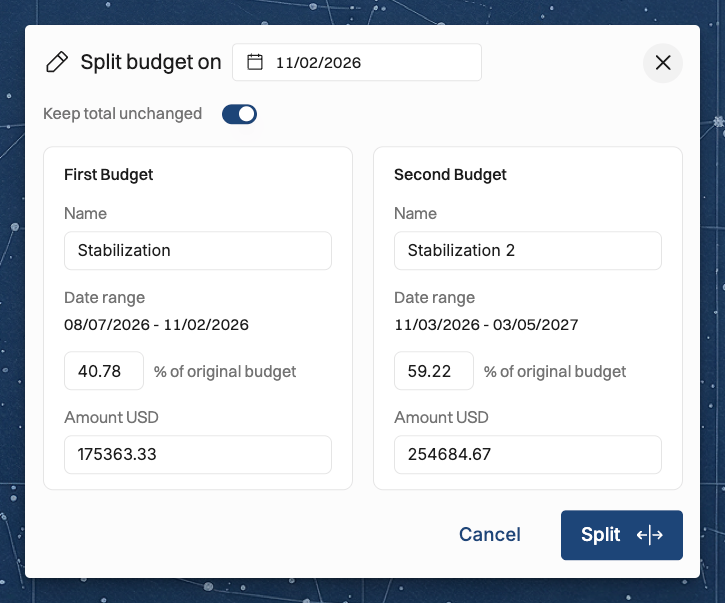
How the amount divides
The suggested amounts. Operating divides the Budget's amount by the planned work on each side of the split date. When the Budget has no planned work, it divides the amount by the number of days on each side.
Your own amounts. You can change the percentage or the amount of either Budget.
Keep total unchanged. With Keep total unchanged on, the two amounts always add up to the original Budget's amount.
Expense budgets. The Budget's expense budgets divide in the same way as its amount.
Progress indications
Splitting a Budget erases its progress indications. When the Budget has progress indications, Operating asks you to confirm with Yes, I'm sure before it splits the Budget.
Related articles
Was this helpful?
Still need help? Ask the team