How to set up invoice numbering
Choose how each company numbers its invoices: one company sequence, or a separate sequence for each client.
Written By Mikko Karjalainen
Last updated 4 days ago
Every ordinary invoice gets its number from the company that issues it. Each company has a numbering mode, which decides where that number comes from:
Company sequence: all clients of the company share one running sequence. This is the default.
Per-client sequences: each client has its own running sequence, with its own prefix, suffix, digit width and next number.
Numbers already on invoices stay as they are when you change the numbering mode or a sequence.
Choose the numbering mode
Go to Settings → Organization → Companies and select the company.
In Invoicing settings, find Numbering mode.
Select Company sequence or Per-client sequences.
Click Update.
Operating confirms with Updated the numbering mode for {company}.
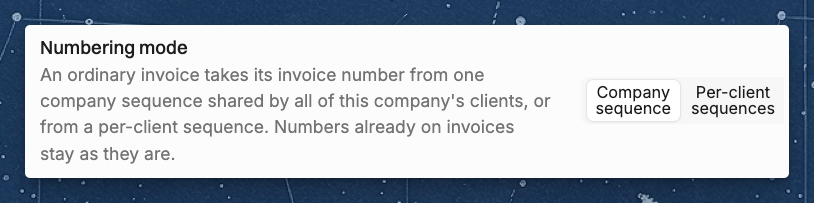
You can change the numbering mode when you have the Manage company-wide settings permission and Enable invoicing is on for the company.
Set up the company sequence
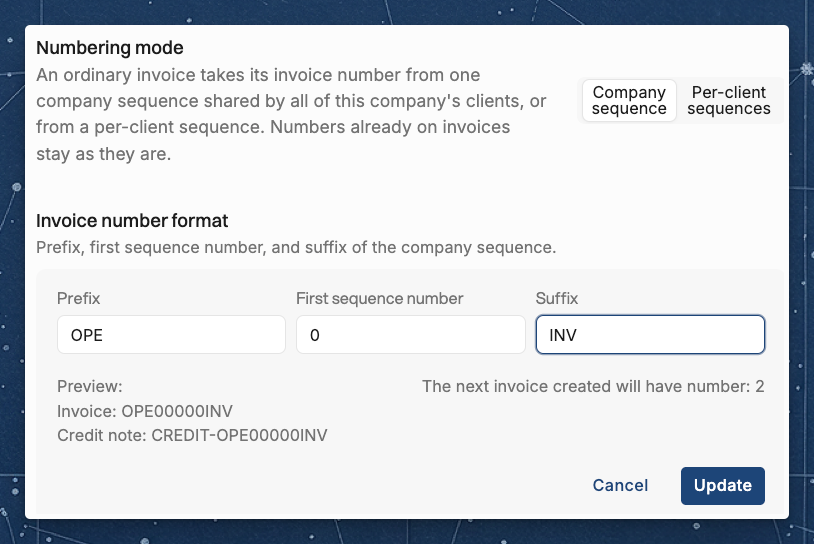
In company sequence mode, the Invoice number format section sets the company sequence:
Prefix: text in front of the number.
First sequence number: the number the sequence counts from. It can't be lower than the current sequence number.
Suffix: text after the number.
The section shows a preview of an invoice number and a credit note number, and the number of the next invoice. Click Update to save.
Set up per-client sequences
In per-client mode, each client of the company has its own sequence. A client that has no invoice from the company yet starts with these values:
Prefix: the client's name in capital letters without spaces, up to 10 characters.
Digit width: 5.
First invoice number: 1.
For example, the first invoice to the client Acme Corp gets the number ACMECORP00001.
To change a client's sequence:
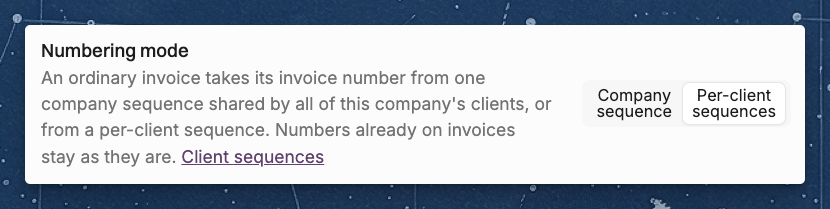
In the Numbering mode section, click Client sequences. The link shows when the company uses per-client sequences.
Find the client in the Per-client sequences list. Type in Search clients to narrow the list. The list shows each client with its Next number.
Click the client's row.
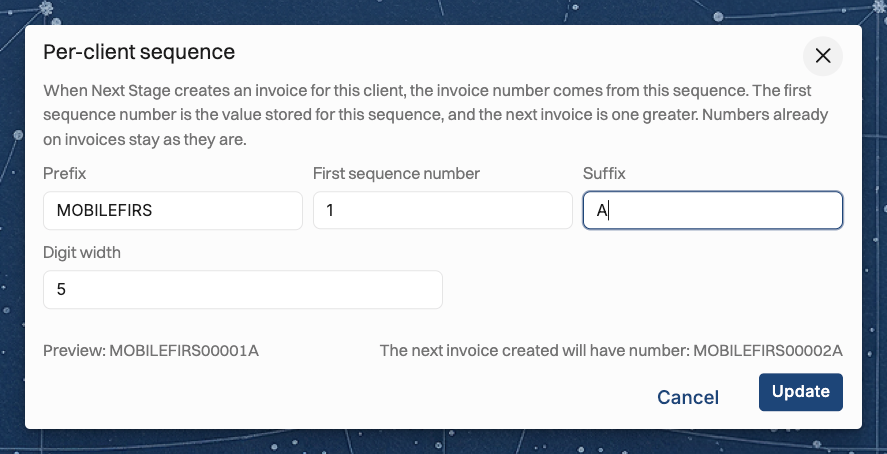
Set the Prefix, First sequence number, Suffix and Digit width. The next invoice gets the number one greater than the First sequence number, and the dialog previews it.
Click Update.
Operating confirms with Updated the per-client sequence for {company}. Click Back to invoice number format to return to the company's settings.
You can also open a client's sequence from the client's page. In the Invoicing section, each company that uses per-client sequences shows a tag with its next invoice number for that client. Click the tag to edit the sequence.
The invoice number preview
When you create an invoice, the new-invoice side panel and the invoice details show a preview of the invoice's number. In company sequence mode, the preview is the company's next number. In per-client mode, it is the client's next number.
If your connected accounting system numbers your invoices, neither sequence is used. When you create an invoice, the Invoice number field is greyed out and shows Numbered by your accounting system (QuickBooks, Xero, NetSuite…) when first saved there. The invoice gets its number when it is first saved in {accounting system}.
While your accounting system numbers a company's invoices, the company's Invoicing settings show Not used: your accounting system numbers this company's invoices. under Numbering mode. You can't change the numbering mode, the Invoice number format or the Per-client sequences, and the settings don't show the next invoice number.
Credit notes
A credit note takes no number from either sequence:
A credit note for an invoice gets the invoice's number with CREDIT- in front.
A freeform credit note keeps the number you type in Credit note number. If you leave the number blank, Operating shows A credit note needs an invoice number. Type a number and save again.
Invoice number messages
Operating shows these messages when it can't give an invoice its number, or when it can't save a sequence you changed. Each message below says what went wrong and which setting to change.
Invoice number {number} already exists. Raise this client's sequence start. The client's sequence gave a number that another invoice already has. Open the client's sequence and set a higher First sequence number.
Invoice number {number} already exists, fix the invoice sequence number in the company settings The company sequence gave a number that another invoice already has. Set a higher First sequence number in the company's Invoice number format.
This company uses its company sequence. You opened or saved a client's sequence while the company uses its company sequence. Switch the company to Per-client sequences first.
A sequence start below the current counter is refused. Invoices already use numbers up to the sequence's current counter. In the client's sequence, enter a First sequence number that is at least the current counter.
Digit width is a whole number from 1 to 12 You entered a Digit width outside that range. Enter a whole number from 1 to 12.
Related articles
Was this helpful?
Still need help? Ask the team