How to set targets on a Budget
Add, change and remove hours, cost, margin and hourly rate targets in the Budget dialog, and what to do when Operating refuses one.
Written By Mikko Karjalainen
Last updated About 23 hours ago
Set targets in the Budget's dialog. A target is an internal figure for the hours, the cost, the margin or the hourly rate you plan a Budget's work to. For how Operating measures targets, see How budget targets work.
Before you start
Permission. To set targets, you need to be able to edit the Project's Budgets: the Manage rates, budgets and planned expenses permission.
Targets turned on. If the Budget dialog has no Targets section, Targets are turned off for the Project. On the Project setup tab, open Advanced features and set Targets to Enabled. If you can't enable it, your organization has turned Targets off for all Projects.
Access to costs and revenue. You can set cost and margin targets only if you can see costs. You can set margin and hourly rate targets only if you can see revenue.
Set targets on a Budget
Open the Budget's dialog. On the Project setup tab, click Edit on the Budget, or click the Budget's text in the Budget row of the project timeline.
Open the Targets section. When it is closed, its heading shows a summary of the Budget's targets.
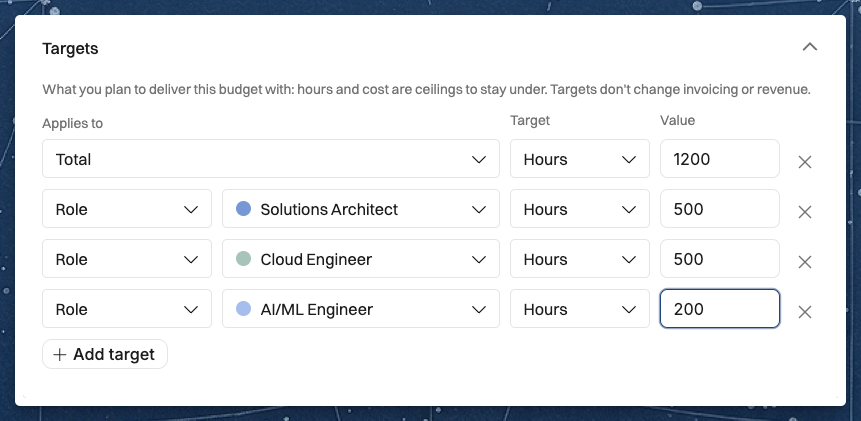
Click Add target. A new row appears.
In Applies to, choose Total for the whole Budget. To set a target for one Role, Seniority, Person or Task, choose that and then pick the one it applies to.
In Target, choose Hours, Cost, Margin or Hourly rate. The list shows only the metrics the row can take.
In Value, enter the figure: hours, an amount in the Project's currency, a margin percentage, or an amount per hour.
Add a row for each other target you want.
Click Save.
On a time-and-materials or non-billable Budget, the amount is optional. Leave it empty when the Budget plans the work with targets alone.
Set targets on a retainer
On a retainer Project, set the targets in the Edit retainer dialog. Operating copies them onto every retainer period. To change the targets of one period, open that period's Edit Retainer Period dialog, which has the same Targets section. See How to set up a retainer project.
Change or remove a target
Change the metric. Choose another metric in Target. The value clears, and the row reads, for example, "Replaces the current 40 h target." until you save.
Remove a target. Click the X icon at the end of the row, then click Save.
A hidden target. A row such as Margin target, hidden from you is a target you don't have the access to see. You can't change or remove it, and it stays when you save.
Messages when a target is refused
These messages appear in the Budget dialog or the Edit retainer dialog when you click Save. The last one appears when you change the billing type of the Project or a phase.
Choose who or what — the row applies to a role, seniority, person or task, but none is picked. Pick one, or choose Total.
Enter a target greater than 0 — the row's value is empty or 0. Enter a value, or remove the row.
A margin target can be at most 100% — enter a margin of 100 or less.
This budget already has a target for this role, seniority, person or task, or for the total — two rows apply to the same thing. Remove one of them.
Margin and effective hourly rate targets are only for retainers that do not invoice overage. Set the retainer's overage behavior to not invoiced, or use an hours or cost target. — the retainer has included hours and Invoice overage is on. Turn off Invoice overage, or change the target to Hours or Cost.
Margin and effective hourly rate targets are only for fixed-price budgets. Use an hours or cost target. — the Budget isn't fixed-price. Change the target to Hours or Cost.
Remove the margin and effective hourly rate targets before switching to a billing type whose revenue moves with the work — you changed a fixed-price or retainer Project to another billing type while a Budget has a margin or hourly rate target. Remove those targets first, then change the billing type. For a phase, the message reads "…from the phase's budgets…".
Related articles
Was this helpful?
Still need help? Ask the team