How budget targets work
What a target on a Budget measures, what it covers, and where Operating shows how the work stands against it.
Written By Mikko Karjalainen
Last updated About 23 hours ago
A target is a figure you plan a Budget's work against: the hours it should take, what it should cost, or the margin or hourly rate it should earn. Operating measures the Budget's work against each target and shows how it stands on the timeline and the Status tab.
Targets are internal plans. They don't change invoicing, revenue or revenue recognition. To add targets, see How to set targets on a Budget.
The four metrics
Each target measures one metric:
What a target covers
A target covers the Total of the Budget, or one Role, Seniority, Person or Task. A Budget has at most one target for the Total, and one for each role, seniority, person or task.
A target for a role, seniority, person or task measures hours or cost. It counts the work tracked by that person, on that task, or on Positions with that role or seniority.
Where margin and hourly rate targets are available
Margin and hourly rate targets need revenue that doesn't change with the work, so they are for the Total only. They are available on:
Fixed-price Budgets: the Budget's amount is the price.
Retainer periods that bill no overage: the period has no included hours, or its overage isn't invoiced.
Every other Budget takes hours and cost targets. On time-and-materials and non-billable Budgets, the amount is optional, so a Budget can plan the work with targets alone.
How Operating measures a target
Operating reads two figures for each target:
Actual: for hours and cost, the work tracked on the Budget so far.
Forecast: the work tracked up to the forecast cutoff, plus the work planned after it up to the Budget's end.
Margin and hourly rate targets are measured on the forecast, against the Budget's amount. A task target has no forecast, because planned work doesn't name a task.
Who sees a target
A target's value follows what the viewer may see:
Cost and margin targets need access to costs.
Margin and hourly rate targets need access to revenue.
A person without that access sees that the target exists, but not its value or how the work stands against it. They can't change or remove it, and it stays on the Budget when they save the Budget.
Splits and retainers
Split a Budget: the hours and cost targets divide between the two Budgets by the number of days in each. Margin and hourly rate targets copy to both. See How to split a Budget.
Retainer: targets set in the retainer's settings copy onto every retainer period. When you change them, Operating replaces the copied targets on the periods that aren't invoiced yet. Targets hidden from the person who makes the change stay as they are. See How retainers work in Operating.
Where targets show
Budgets on the Project setup tab: the target for the Total shows next to the Budget's amount, followed by a count of the other targets, for example "+2 targets split by role and task".
Budget bar on the timeline: on a Budget that isn't a retainer period, the bar shows the work as a share of the target for the Total. Before the Budget starts, it counts the allocated work. While the Budget runs, it counts the forecast, and after the Budget ends, the tracked work.
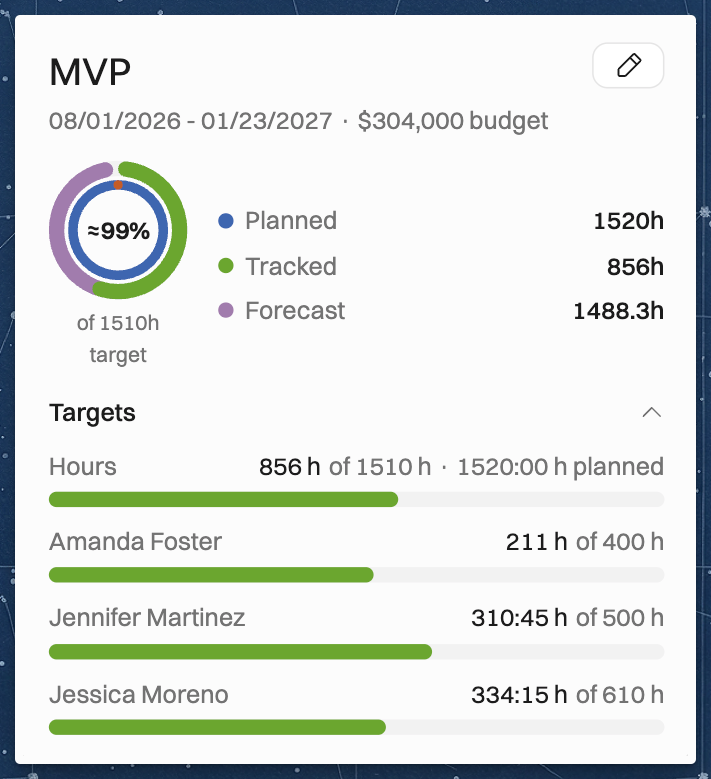
Budget card on the timeline: the ring measures the same work against the target. For a margin or hourly rate target, the ring measures against the most cost or the most hours the Budget's amount allows. Hover over the help icon next to the caption under the ring to see how it is worked out. Click the Targets heading on the card to see the targets for a role, seniority, person or task.
Status tab: the burnup graph draws a dotted target line, and the Target progress table lists each target with its actual figure, forecast and status. See How to interpret the project details page.
Retainer Status tab: the period chart and each period show the period's targets. See How retainers work in Operating.
Related articles
Was this helpful?
Still need help? Ask the team